Created page with "{{short description|Line of smartphones designed and marketed by Apple Inc.}} {{short description|Line of smartphones designed and marketed by Apple Inc.}} {{en-Wikipedia}} {{..."
{{short description|Line of smartphones designed and marketed by Apple Inc.}}
{{short description|Line of smartphones designed and marketed by Apple Inc.}}
{{short description|Line of smartphones designed and marketed by Apple Inc.}}
{{en-Wikipedia}}
{{Infobox information appliance
{{Infobox information appliance
| name = iPhone
| name = iPhone
Line 432:
Line 430:
{{Wide image|IPhone size comparison.svg|900px|A comparison of iPhone sizes from the iPhone 5S to the iPhone 12.}}
{{Wide image|IPhone size comparison.svg|900px|A comparison of iPhone sizes from the iPhone 5S to the iPhone 12.}}
==Hardware==
===Screen and input===
The [[touchscreen]] on the first five generations is a {{convert|3.5|in|mm|-1}} [[liquid crystal display]] with scratch-resistant glass; The one on the iPhone 5, 5C, 5S, and first generation SE is {{convert|4|in|mm}}; The size of the iPhone 6, 6S, 7, 8, and second generation SE is {{convert|4.7|in|mm}}; the iPhone 6 Plus, 6S Plus, 7 Plus, and 8 Plus is {{convert|5.5|in|mm}}; The iPhone X, XS, and 11 Pro with {{convert|5.8|in|mm}}; The iPhone XR, and 11 with {{convert|6.1|in|mm}}; and the iPhone XS Max and 11 Pro Max with {{convert|6.5|in|mm}}.<ref name="jun18PressRelease" /> The [[capacitive touchscreen]] is designed for a bare finger, or multiple fingers for [[multi-touch]] sensing. The screens on the first three generations have a resolution of 320×480 ([[HVGA]]) at 163 [[pixel density|ppi]]; those on the [[iPhone 4]] and [[iPhone 4S]] have a resolution of 640×960 at 326 ppi; the {{convert|4|in|mm}} models, with 640×1136 at 326 ppi; the {{convert|4.7|in|mm}} models, with 750×1334 at 326 ppi; the {{convert|5.5|in|mm}} models, with 1080×1920 at 401 ppi; and the {{convert|5.8|in|mm}} model X, with 1125×2436 at 458 ppi. The initial models were using [[twisted nematic|twisted-nematic (TN) LCDs]]. Starting with iPhone 4, the technology was changed to [[IPS panel|in-plane switching (IPS) LCDs]]. The iPhone 5 model's screen results in an aspect ratio of approximately 16:9. The [[iPhone X]] is the first iPhone to use an [[OLED]] display. It has a near bezel-less screen with a ≈19.5:9 aspect ratio.<ref>{{Cite web|url=https://www.apple.com/iphone-x/specs/|title=iPhone X – Technical Specifications|publisher=Apple Inc.|access-date=2017-09-14}}</ref>
[[File:iPhone 5s top.jpg|thumb|The top and side of an [[iPhone 5S]], externally identical to the [[iPhone SE (1st generation)|SE (2016)]]. From left to right, sides: wake/sleep button, silence switch, volume up, and volume down.]]
The touch and gesture features of the iPhone are based on technology originally developed by [[FingerWorks]].<ref>{{cite web|title=iGesture Game Mode Guide|last=Fingerworks, Inc.|year=2003|publisher=fingerworks.com|url=http://users.erols.com/rwservices/pens/biblio05.html|access-date=April 30, 2009 }}</ref> Most gloves and [[Stylus (computing)|styli]] prevent the necessary electrical conductivity;<ref name=HowiPhoneWorks>{{cite web|last=Wilson|first=Tracy|url=http://electronics.howstuffworks.com/iphone.htm|title=How the iPhone Works|work=[[HowStuffWorks]]|access-date=June 6, 2008|date=June 20, 2007}}</ref><ref name=pogueFAQ>{{cite news|author-link=David Pogue|last=Pogue|first=David|url=http://pogue.blogs.nytimes.com/2007/01/11/the-ultimate-iphone-frequently-asked-questions/|title=The Ultimate iPhone Frequently Asked Questions|work=The New York Times|date=January 11, 2007|access-date=June 6, 2008}}</ref><ref name=pogueFAQ2>{{cite news|author-link=David Pogue|last=Pogue|first=David|url=http://pogue.blogs.nytimes.com/2007/01/13/ultimate-iphone-faqs-list-part-2/|title=Ultimate iPhone FAQs list, Part 2|work=The New York Times|date=January 13, 2007|access-date=June 6, 2008}}</ref><ref>{{cite web|url=http://electronics.howstuffworks.com/iphone2.htm|title=How the iPhone's touchscreen Works|work=[[How Stuff Works]]|access-date=June 6, 2008|date=June 20, 2007}}</ref> although [[capacitive stylus|capacitive styli]] can be used with iPhone's finger-touch screen. The iPhone 3GS and later also feature a [[fingerprint]]-resistant [[Lipophobicity|oleophobic]] coating.<ref>{{cite web|first=Eric|last=Slivka|url=http://www.macrumors.com/2009/06/10/more-wwdc-tidbits-iphone-3g-s-oleophobic-screen-find-my-iphone-live|title=More WWDC Tidbits: iPhone 3G S Oleophobic Screen, "Find My iPhone" Live|work=Mac Rumors|date=June 10, 2009|access-date=July 3, 2009}}</ref>
[[File:Iphone back.jpg|thumb|The backs of a gold [[iPhone 6S]], a silver [[iPhone 6 Plus]], and a rose gold iPhone 6S.]]
The iPhone has a minimal hardware user interface, with most models featuring five [[Push-button|buttons]]. The only physical menu button is situated directly below the display and is called the "Home button" because its primary function is to close the active app and navigates to the home screen of the interface. Earlier models included a [[Squircle|rounded square]], reminiscent of the shape of icons on the home screen, however, new models which include Apple's [[fingerprint recognition]] feature [[Touch ID]] (which use the Home button as the fingerprint sensor) have no symbol. The [[iPhone X]] and later with the exception of the [[iPhone SE (2nd generation)]] don't have a Home button but instead [[Face ID]], a facial recognition authentication method.<ref>{{cite news|last1=Gibbs|first1=Samuel|title=iPhone X: new Apple smartphone dumps home button for all-screen design|url=https://www.theguardian.com/technology/2017/sep/12/iphone-x-release-date-apple-home-button-screen|work=[[The Guardian]]|access-date=September 12, 2017|date=September 12, 2017}}</ref>
A multi-function sleep/wake button is located on top of the device on earlier models. In the newer models starting with the iPhone 6, it is on right of the device. It serves as the unit's power button, and also controls [[#Phone|phone calls]]. When a call is received, pressing the sleep/wake button once silences the ringtone, and when pressed twice transfers the call to voicemail. Situated on the left spine are the volume adjustment controls. The iPhone 4 has two separate circular buttons to increase and decrease the volume; all earlier models house two switches under a single plastic panel, known as a rocker switch, which could reasonably be counted as either one or two buttons.
Directly above the volume controls is a ring/silent switch that when engaged mutes telephone ringing, alert sounds from new & sent emails, text messages, and other push notifications, camera shutter sounds, Voice Memo sound effects, phone lock/unlock sounds, keyboard clicks, and spoken auto-corrections. This switch does not mute alarm sounds from the Clock application, and in some countries or regions it will not mute the camera shutter or Voice Memo sound effects.<ref>[http://manuals.info.apple.com/en_US/iphone_user_guide.pdf manuals.info.apple.com/en_US/iphone_user_guide.pdf] {{Webarchive|url=https://web.archive.org/web/20120308105745/http://manuals.info.apple.com/en_US/iPhone_User_Guide.pdf |date=March 8, 2012 }}. (PDF). Retrieved November 6, 2011.</ref> All buttons except Home were made of plastic on the original first-generation iPhone and metal on all later models. The touchscreen furnishes the remainder of the [[#Interface|user interface]].
A software update in January 2008<ref name="Update 1.1.3"/> allowed the first-generation iPhone to use cell tower and Wi-Fi network locations [[trilateration]],<ref>{{cite web|url=http://www.howardforums.com/printthread.php?t=1383413|title=Memo: iPhone does not use triangulation|last=XFF |display-authors=etal |date=June 13, 2008|publisher=HowardForums|access-date=June 1, 2009}}</ref> despite lacking [[Global Positioning System|GPS]] hardware. Since the iPhone 3G generation, the iPhone employs [[Assisted GPS|A-GPS]] operated by the United States. Since the iPhone 4S generation the device also supports the [[GLONASS]] global positioning system, which is operated by Russia. Since the iPhone 8 it supports [[Galileo (satellite navigation)|Galileo]].<ref>{{Cite web|url=https://galileognss.eu/is-your-phone-using-galileo/|title=Is your phone using Galileo? {{!}} GALILEO|access-date=2019-08-16}}</ref>
====3D Touch and Haptic Touch====
{{Main|Force Touch}}
The [[IPhone 6S|iPhone 6S and 6S Plus]], introduced in 2015, feature [[Force Touch|3D Touch]] displays which allow the screen to recognize how hard it is being pressed using pressure-sensitive multi-touch technology, and a new Taptic Engine to provide haptic feedback.<ref>{{cite web |last1=Betters |first1=Elyse |title=What is Force Touch? Apple's haptic feedback technology explained - Pocket-lint |url=https://www.pocket-lint.com/laptops/news/apple/133176-what-is-force-touch-apple-s-haptic-feedback-technology-explained |website=Pocket-lint |access-date=November 19, 2018 |date=March 11, 2015}}</ref> In addition to visual cues, 3D Touch uses the Taptic Engine to provide a tactile sensation relative to the force being applied to the display to indicate to the user that a light or deep press action has been completed. An example of how this technology was used is lightly pressing the screen to preview a photograph and deeply pressing to open it, a feature dubbed 'Peek and Pop' by Apple.<ref>{{Cite web|date=2015-12-04|title=iPhone 6s - 3D Touch - Apple|url=http://www.apple.com/iphone-6s/3d-touch/|access-date=2021-01-07|archive-url=https://web.archive.org/web/20151204044155/http://www.apple.com/iphone-6s/3d-touch/|archive-date=December 4, 2015}}</ref>
All iPhones starting with the iPhone 6s (with the exception of the [[IPhone SE (1st generation)|first-generation iPhone SE]] and [[iPhone XR]]<ref>{{cite web |title=Does the iPhone XR have 3D Touch? {{!}} The iPhone FAQ |url=https://www.iphonefaq.org/archives/976797 |website=www.iphonefaq.org }}</ref>) had this feature. Starting in 2019 however, 3D Touch was omitted on all iPhones starting with the [[iPhone 11]]/[[iPhone 11 Pro]], and its software features were removed from [[iOS 13]] and later in favour of Haptic Touch. Haptic Touch retains much of the functionality of 3D Touch but cannot detect pressure, as the display lacks integrated capacitive sensors. Actions that previously required a deep press now only require a long press, and the haptic feedback is no longer associated with the applied pressure but rather the touch duration. Due to the migration from 3D Touch to Haptic Touch, all [[iPad]] models that can update to [[iPadOS 13]], along with the [[iPhone SE (1st generation)|first-generation iPhone SE]] and [[IPod Touch (7th generation)|seventh-generation iPod touch]], which previously did not support 3D Touch, gained similar Haptic Touch functionality with the iOS 13 and iPadOS 13 updates, although without any haptic feedback.
iPhones feature a number of sensors, which are used to adjust the screen based on operating conditions, enable motion-controlled games, [[location-based service]]s, unlock the phone, and authenticate purchases with [[Apple Pay]], among many other things.
====Proximity sensor====
A [[proximity sensor]] deactivates the display and [[touchscreen]] when the device is brought near the face during a call. This is done to save battery power and to prevent inadvertent inputs from the user's face and ears.<ref>{{Cite web|url=https://www.businessinsider.com/how-to-turn-off-proximity-sensor-iphone|title=How to fix or reset the proximity sensor on your iPhone if it's not working properly|last=John|first=Steven|website=Business Insider|access-date=2019-11-13|date=August 20, 2019}}</ref> The iPhone's proximity sensors detect the ear and switches off the light, saving power and stopping the face from unintentionally pressing buttons. A phone case, dirt or grime, or a software problem may cause the proximity sensor to malfunction.<ref>{{Cite web|last=John|first=Steven|title=How to fix or reset the proximity sensor on your iPhone if it's not working properly|url=https://www.businessinsider.com/how-to-turn-off-proximity-sensor-iphone|access-date=2021-05-15|website=Business Insider|language=en-US}}</ref>
====Ambient light sensor====
An [[photodetector|ambient light sensor]] adjusts the display brightness which saves battery power and prevents the screen from being too bright or too dark.<ref>{{Cite web|url=https://www.lifewire.com/sensors-that-make-iphone-so-cool-2000370|title=All About the Sensors That Make the iPhone So Cool|last=Costello|first=Sam|date=12 September 2019|website=Lifewire|language=en|access-date=2019-11-13}}</ref> True Tone, which is activated by default, uses advanced sensors to change the colour and intensity of the iPhone screen to match the ambient light, resulting in more natural-looking images. The [[ambient light sensor]] decides how much light is available around the iPhone and other apple products, such as the iPod and iPad. The device changes the screen brightness automatically based on this knowledge to save battery life and minimize eye strain.<ref name="Facebook">{{Cite web|last=Costello|first=Sam|title=All About the Sensors That Make the iPhone So Cool|url=https://www.lifewire.com/sensors-that-make-iphone-so-cool-2000370|access-date=2021-05-15|website=Lifewire|language=en}}</ref>
====Accelerometer====
A 3-axis [[accelerometer]] senses the orientation of the phone and changes the screen accordingly, allowing the user to easily switch between [[page orientation|portrait and landscape]] mode.<ref>{{cite news|last=Johnson|first=R. Collin|url=http://www.eetimes.com/showArticle.jhtml?articleID=200900669|title=There's more to MEMS than meets the iPhone|work=[[EE Times]]|date=July 9, 2007|access-date=June 6, 2008|archive-url=https://web.archive.org/web/20070929095647/http://www.eetimes.com/showArticle.jhtml?articleID=200900669|archive-date=September 29, 2007}}</ref> Photo browsing, web browsing, and music playing support both upright and left or right widescreen orientations.<ref>{{cite web|url=https://www.apple.com/ipodtouch/guidedtour/tour/medium.html|title=iPod touch – A Guided Tour|publisher=Apple Inc.|access-date=September 23, 2008|archive-url=https://web.archive.org/web/20080514121314/http://www.apple.com/ipodtouch/guidedtour/tour/medium.html <!-- Bot retrieved archive -->|archive-date=May 14, 2008}}</ref> Unlike the [[iPad]], the iPhone does not rotate the screen when turned upside-down, with the Home button above the screen, unless the running program has been specifically designed to do so. The 3.0 update added landscape support for still other applications, such as email, and introduced shaking the unit as a form of input (generally for [[undo]] functionality).<ref name="3.0 official" /><ref name="3.0 Macworld" /> The accelerometer can also be used to control [[#Third-party applications|third-party apps]], notably games. It is also used for fitness tracking purposes, primarily as a [[pedometer]]. Starting with the iPhone 5S, this functionality was included in the M7 [[Motion coprocessor]] and subsequent revisions of the embedded chip.
====Magnetometer====
A [[magnetometer]] is built-in since the iPhone 3GS, which is used to measure the strength and direction of the magnetic field in the vicinity of the device. Sometimes certain devices or radio signals can interfere with the magnetometer requiring users to either move away from the interference or re-calibrate by moving the device in a figure-eight motion. Since the iPhone 3GS, the iPhone also features a Compass app, which was unique at time of release, showing a compass that points in the direction of the magnetic field.
====Gyroscopic sensor====
Since the iPhone 4, the 4th Generation iPod touch, and the iPad 2, a three-axis gyroscope was included. This sensor will run on six axes due to the combination of a gyroscope and an accelerometer. One of the main reasons of the implementation was to enhance gaming mechanics such as the sensitivity and responsiveness aspects. It is compatible with iPhone, iPad, and iPod touch.<ref name="Facebook"/>
==== Radio ====
Some previous iPhone models contained a chip capable of receiving [[radio|radio signals]];<ref>{{cite journal|url=https://www.wired.com/2016/07/phones-fm-chips-radio-smartphone/|title=Your Phone Has an FM Chip. So Why Can't You Listen to the Radio? |journal=[[Wired (magazine)|Wired]]|date=July 8, 2016 |last1=Glaser |first1=April }}</ref> however, Apple has the FM radio feature switched off because there was no antenna connected to the chip. Later iterations of the iPhone (starting with the iPhone 7), however, do not contain radio chips at all.<ref>{{Cite news|url=https://9to5mac.com/2017/09/28/iphone-7-iphone-8-fm-radio-features/|title=Apple says iPhone 7 and iPhone 8 do not contain FM radio chips or antennas, in response to FCC request|date=2017-09-28|work=9to5Mac|access-date=2017-11-17}}</ref> A campaign called "Free Radio On My Phone" was started to encourage cellphone manufacturers such as Apple to enable the radio on the phones they manufacture, reasons cited were that radio drains less power and is useful in an emergency such as the [[2016 Fort McMurray Wildfire]].<ref>{{cite web|url=http://www.cbc.ca/news/business/fm-radio-cellphone-telecoms-1.3577447|title=Broadcasters push for unlocked radio on smartphones that won't drain your data|last=Harris|first=Sophia|date=May 15, 2016|publisher=Canadian Broadcasting Corporation}}</ref>
==== Fingerprint sensor ====
Until 2017, iPhone models starting from [[iPhone 5S]] (excluding the [[iPhone 5C]]) featured Apple's [[fingerprint recognition]] sensor. It is used for unlocking the device and authenticating Apple Pay purchases (since the [[iPhone 6]]) using [[Touch ID]]. It is located in the home button. Touch ID has been replaced by Face ID (excluding the [[iPhone SE (2nd generation)]]), starting with the [[iPhone X]]. The fingerprint sensor uses the user's biometric information to give the user quick access to the device. It can also be used to open applications and approve transactions. It's compatible with iPhone, iPad, and iPod touch.
==== Barometer ====
Included on the [[iPhone 6]] and later (excluding the [[iPhone SE (1st generation)]]), a [[barometer]] is used to determine air pressure and elevation.<ref>{{cite web|url=http://www.iphonetricks.org/iphone-6-barometer-sensor-features/|title=iPhone 6 Barometer Sensor Features {{!}} iPhoneTricks.org|website=www.iphonetricks.org|access-date=February 19, 2017}}</ref> This sensor is used to provide position and navigational features by determining the altitude through evaluating air pressure. The barometers will allow the device to be pinpointed.
==== Facial recognition sensor ====
Starting with the [[iPhone X]], a [[facial recognition system|facial recognition]] sensor, named the TrueDepth camera system, is featured. It is used for unlocking the device and for authenticating purchases using [[Face ID]]. It can also be used for [[Animoji]]s and [[augmented reality|AR]].
===Audio and output===
[[File:Bottom of iPhone.jpg|thumb|From left to right is the headphone jack, microphone, Lightning connector, and built-in speaker on the base of the iPhone 5S.]]
On the bottom of the iPhone, there is a speaker to the left of the dock connector and a microphone to the right. There is an additional loudspeaker above the screen that serves as an earpiece during phone calls. The iPhone 4 includes an additional [[Noise-canceling microphone|microphone]] at the top of the unit for [[noise cancellation]], and switches the placement of the microphone and speaker on the base on the unit—the speaker is on the right.<ref name="4_tech_specs">{{cite web|title=Apple – iPhone 4 – Size, weight, battery life, and other specs|url=https://www.apple.com/iphone/specs.html|publisher=Apple Inc.|access-date=July 1, 2010|archive-url=https://www.webcitation.org/5quBTT6io?url=http://www.apple.com/iphone/specs.html|archive-date=July 1, 2010}}</ref> Volume controls are located on the left side of all iPhone models and as a slider in the iPod application.
The 3.5 mm [[TRRS connector]]<!-- Not a typo, two Rs --> for the headphones is located on the top left corner of the device for the first five generations (original through 4S), after which time it was moved to the bottom left corner.<ref name="TRRS">{{cite web|url=http://encyclopedia2.thefreedictionary.com/Tip+and+ring|title=tip and ring|publisher=The Computer Language Company Inc.|access-date=March 15, 2009}}</ref> The headphone socket on the first-generation iPhone is recessed into the casing, making it incompatible with most headsets without the use of an adapter.<ref name="CNET original iPhone review"/> Subsequent generations eliminated the problem by using a flush-mounted headphone socket. Cars equipped with an [[electrical connector|auxiliary jack]] allow handsfree use of the iPhone while driving as a substitute for [[Bluetooth]]. The iPhone 7 and later have no 3.5 mm headphone jack,<ref name="apple.com">{{cite web|url=https://www.apple.com/iphone-7/specs/|title=iPhone 7 – Technical Specifications|publisher=Apple Inc.|access-date=October 20, 2016}}</ref> and instead headsets must connect to the iPhone by [[Bluetooth]], use Apple's [[Lightning (connector)|Lightning port]] (which has replaced the 3.5 mm headphone jack), or (for traditional headsets) use the Lightning to 3.5 mm headphone jack adapter, which is included with iPhone 7 up until iPhone X and plugs into the Lightning port. This adapter is available for purchase at several leading retailers.<ref>{{Cite web|url=https://9to5mac.com/2016/09/07/apple-to-sell-replacement-lightning-to-3-5mm-headphone-adapter-for-9/|title=Apple to sell replacement Lightning to 3.5mm headphone adapter for $9|first=Chance|last=Miller|date=September 7, 2016}}</ref>
Apple's own [[headset (audio)|headset]] has a multipurpose button near the microphone that can play or pause music, skip tracks, and answer or end phone calls without touching the iPhone. Some third-party headsets designed for the iPhone also include the microphone and control button.<ref name="Review: iPhone headsets">{{cite web|url=http://www.macworld.com/article/133445/2008/05/iphoneheadsets.html|title=Review: iPhone headsets|last=Frakes|first=Dan|date=May 14, 2008|work=Macworld|access-date=January 10, 2009}}</ref> The current headsets also provide volume controls, which are only compatible with more recent models.<!-- 3GS & 4 --><ref name="Earbuds with volume">{{cite web|url=http://store.apple.com/us/product/MB770G/B?fnode=MTY1NDA1MA&mco=MTM3NTI1ODk|title=Apple Earphones with Remote and Mic|publisher=Apple Store|access-date=May 19, 2009}}</ref> A fourth ring in the audio jack carries this extra information.
The built-in [[Bluetooth 2.0 + EDR|Bluetooth 2.x+EDR]] supports wireless earpieces and headphones, which requires the [[Bluetooth profile#Headset Profile (HSP)|HSP]] [[Bluetooth profile|profile]]. Stereo audio was added in the 3.0 update for hardware that supports [[A2DP]].<ref name="3.0 official" /><ref name="3.0 Macworld" /> While non-sanctioned third-party solutions exist, the iPhone does not officially support the [[OBEX]] [[Bluetooth protocols#Object exchange (OBEX)|file transfer]] [[Bluetooth protocols|protocol]].<ref>{{cite web |first=Erica |last=Sadun |title=iBluetooth team achieves OBEX file transfer |url=https://arstechnica.com/apple/2009/01/ibluetooth-team-achieves-obex-file-transfer/ |work=[[Ars Technica]] |date=January 26, 2009 |access-date=March 23, 2017}}</ref> The lack of these profiles prevents iPhone users from exchanging multimedia files, such as pictures, music and videos, with other Bluetooth-enabled cell phones.
Composite<ref>{{cite web|url=http://store.apple.com/us/product/MC748ZM/A?mco=MTY3ODQ5OTY|title=Apple Composite AV Cable|publisher=Apple Inc.|access-date=September 7, 2011}}</ref> or component<ref>{{cite web|url=http://store.apple.com/us/product/MC917ZM/A?mco=MTY3ODQ5OTY|title=Apple Component AV Cable|publisher=Apple Inc.|access-date=September 7, 2011}}</ref> video at up to [[576i]] and stereo audio can be output from the dock connector using an adapter sold by Apple. iPhone 4 also supports 1024×768 [[Video Graphics Array|VGA]] output<ref>{{cite web|url=http://store.apple.com/us/product/MC552|title=Apple VGA Adapter|publisher=Apple Inc.|date=April 3, 2011|access-date=September 7, 2011}}</ref> without audio, and [[HDMI]] output,<ref>{{cite web|url=http://store.apple.com/us/product/MC953ZM/A?fnode=MTc0MjU4NjE&mco=MjE1Mjg1OTQ|title=Apple Digital AV Adapter|publisher=Apple Inc.|date=March 11, 2011|access-date=September 7, 2011|url-status=dead|archive-url=https://web.archive.org/web/20110807043237/http://store.apple.com/us/product/MC953ZM/A?fnode=MTc0MjU4NjE&mco=MjE1Mjg1OTQ|archive-date=August 7, 2011|df=mdy-all}}</ref> with stereo audio, via dock adapters.
===Battery===
[[File:IPhone Internals.jpg|thumb|Replacing the battery requires disassembling the iPhone unit and exposing the internal hardware]]
The iPhone features an internal rechargeable [[lithium-ion battery]]. Like an iPod, but unlike most other mobile phones at the time of its launch, the battery is not user-replaceable.<ref name="CNET original iPhone review">{{cite web |first1=Kent |last1=German |first2=Donald |last2=Bell |title=Apple iPhone review |url=https://www.cnet.com/products/apple-iphone/review/ |publisher=[[CNET]] |date=June 30, 2007 |access-date=March 23, 2017}}</ref><ref name="Mobile Burn review">{{cite web|url=http://www.mobileburn.com/review.jsp?Id=3526|title=Review: Apple iPhone, In-Depth|last=Oryl|first=Michael|date=July 3, 2007|work=Mobile Burn|access-date=January 10, 2009|url-status=dead|archive-url=https://web.archive.org/web/20100106163724/http://www.mobileburn.com/review.jsp?Id=3526|archive-date=January 6, 2010|df=mdy-all}}</ref> The iPhone can be charged when connected to a computer for syncing across the included USB to dock connector cable, similar to [[IPod#Connectivity|charging an iPod]]. Alternatively, a USB to AC adapter (or "wall charger", also included) can be connected to the cable to charge directly from an [[AC power plugs and sockets|AC outlet]]. Some models of the iPhone support wireless charging.<ref>{{cite web | title=How to wirelessly charge your iPhone X, iPhone 8, or iPhone 8 Plus | publisher=Apple Inc. | date=December 7, 2017 | url=https://support.apple.com/en-us/HT208078 | access-date=2017-12-29}}</ref> A distinction to Android devices is that connecting an iPhone to a charger while powered off causes it to power on rather than showing a battery indicator without booting.<ref>{{Cite web|url=https://apple.stackexchange.com/questions/38715/why-does-my-iphone-turn-on-when-i-plug-it-in-to-charge|title=charger - Why does my iPhone turn on when I plug it in to charge?|website=Ask Different}}</ref><ref>{{cite web |title=Is there a way to charge my iPhone while it is turned off? {{!}} The iPhone FAQ |url=https://www.iphonefaq.org/archives/97310 |website=www.iphonefaq.org}}</ref>
Apple runs tests on preproduction units to determine battery life. Apple's website says that the battery life "is designed to retain up to 80% of its original capacity after 500 complete charge cycles".<ref>{{Cite web|title=Batteries - Service and Recycling|url=https://www.apple.com/batteries/service-and-recycling/|access-date=2021-01-08|website=Apple|language=en-US}}</ref>
The battery life of early models of the iPhone has been criticized by several technology journalists as insufficient and less than Apple's claims.<ref>{{cite web |first=Jacqui |last=Cheng |title=The Second Coming: Ars goes in-depth with the iPhone 3G |url=https://arstechnica.com/apple/2008/07/iphone3g-review/6/ |website=[[Ars Technica]] |date=July 14, 2008 |access-date=March 23, 2017}}</ref><ref>{{cite web|url=https://gizmodo.com/5024412/iphone-3g-review|title=iPhone 3G Review|author-link=Brian Lam|first=Brian|last=Lam|work=[[Gizmodo]]|date=July 11, 2008|access-date=June 23, 2009}}</ref><ref>{{cite news|url=https://www.washingtonpost.com/wp-dyn/content/article/2008/07/09/AR2008070900177.html|title=First iPhone 3G Reviews: Mossberg: Battery 'Significant Problem'; Pogue: Limited 3G, Good Audio|author=Kramer, Staci D.|work=[[The Washington Post]]|date=July 9, 2008|access-date=June 23, 2009}}</ref><ref>{{cite news|url=http://ptech.allthingsd.com/20080708/newer-faster-cheaper-iphone-3g|title=Newer, Faster, Cheaper iPhone 3G|author-link=Walter Mossberg|first=Walt|last=Mossberg|work=[[All Things Digital]]|date=July 8, 2008|access-date=June 23, 2009}}</ref> This is also reflected by a [[J. D. Power and Associates]] customer satisfaction survey, which gave the "battery aspects" of the iPhone 3G its lowest rating of two out of five stars.<ref name="JD_Power">{{cite web|url=http://www.jdpower.com/corporate/news/releases/pressrelease.aspx?id=2008240|title=2008 Business Wireless Smartphone Customer Satisfaction Study|date=November 6, 2008|publisher=[[J. D. Power and Associates]]|access-date=June 10, 2009}}</ref><ref>{{cite web |first=Tom |last=Krazit |title=Apple's iPhone wins J.D. Power award |url=https://www.cnet.com/news/apples-iphone-wins-j-d-power-award/ |publisher=[[CNET]] |date=November 6, 2008 |access-date=March 23, 2017}}</ref>
If the battery malfunctions or dies prematurely, the phone can be returned to Apple and replaced for free while still under [[warranty]].<ref>{{cite web|url=https://www.apple.com/support/iphone/service/faq/|title=iPhone Service Frequently Asked Questions|publisher=Apple Inc.|access-date=June 6, 2008}}</ref> The warranty lasts one year from purchase and can be extended to two years with [[AppleCare]]. The battery replacement service and its pricing was not made known to buyers until the day the product was launched;<ref name=LeeEllen /><ref>{{cite news|last=Wong|first=May|url=https://www.washingtonpost.com/wp-dyn/content/article/2007/07/08/AR2007070800562_pf.html|title=Apple Issues Battery Program for IPhone|work=The Washington Post|date=July 8, 2007|access-date=July 8, 2007}}</ref> it is similar to how Apple (and third parties) replace batteries for iPods. The [[Foundation for Taxpayer and Consumer Rights]], a [[consumer protection|consumer advocate]] group, has sent a complaint to Apple and [[AT&T]] over the fee that consumers have to pay to have the battery replaced.<ref name=LeeEllen>{{cite news|last=Lee|first=Ellen|url=http://www.sfgate.com/cgi-bin/article.cgi?file=/c/a/2007/07/11/BUG34QU3921.DTL|title=Will a Cheaper iPhone click before Christmas?|work=San Francisco Chronicle|date=July 11, 2007|access-date=June 6, 2008}}</ref>
Since [[iOS 10]].2.1, Apple has instituted a [[Batterygate|policy]] of employing "performance management" techniques (including [[Dynamic frequency scaling|CPU throttling]]) on iPhone devices whose batteries are degraded, in order to maintain device stability and prolong their lifespan. These changes came in the wake of reported issues with unexpected shutdowns on certain iPhone models following the release of iOS 10.1.1. In response to criticism over the practice, including concerns over this being a form of [[planned obsolescence]], Apple announced that it would offer discounted battery replacements for iPhone 6 and newer in 2018, and that it would add additional battery health information on a future version of iOS ([[iOS 11]].3, which also allows users to disable this throttling).<ref>{{Cite web|url=https://www.zdnet.com/article/apple-slowing-down-older-iphones-to-prevent-battery-issues/|title=Apple: Some older iPhones slowed to prevent battery issues|last=Smith|first=Jake|website=ZDNet|language=en|access-date=2019-09-09}}</ref><ref name="verge-iosreplacement">{{Cite web|url=https://www.theverge.com/2017/12/28/16827248/apple-iphone-battery-replacement-price-slow-down-apology|title=Apple apologizes for iPhone slowdown drama, will offer $29 battery replacements for a year|last=Patel|first=Nilay|date=December 27, 2019|website=The Verge|access-date=September 9, 2019}}</ref><ref>{{Cite web|url=https://www.theverge.com/2018/2/7/16984234/how-to-iphone-throttling-ios-11-3|title=How to turn off iPhone throttling in iOS 11.3|last=Byford|first=Sam|date=2018-02-07|website=The Verge|language=en|access-date=2020-01-09}}</ref>
Since July 2007, third-party battery replacement kits have been available<ref>{{cite web |first=Joshua |last=Topolsky |author-link=Joshua Topolsky |title=iPhone's first sketchy battery replacement kit appears |url=https://www.engadget.com/2007/07/31/iphones-first-sketchy-battery-replacement-kit-appears/ |work=[[Engadget]] |date=July 31, 2007 |access-date=March 23, 2017}}</ref> at a much lower price than Apple's own battery replacement program. These kits often include a small screwdriver and an instruction leaflet, but as with many newer iPod models the battery in the first generation iPhone has been [[solder]]ed in. Therefore, a soldering iron is required to install the new battery. The iPhone 3G uses a different battery fitted with a connector that is easier to replace.<ref name="3G quasi-replaceable battery">{{cite web|url=https://gizmodo.com/5023983/the-iphone-3g-battery-is-quasi+replaceable|title=The iPhone 3G Battery Is Quasi-Replaceable|last=Wilson|first=Mark|date=July 10, 2008|work=[[Gizmodo]]|access-date=January 10, 2009}}</ref> The iPhone X features a different battery, with two battery cells, and the adhesive pull tabs are adhered to the sides instead of folded over the top, therefore making repairs a little more difficult than before.<ref>{{Cite news|url=https://www.ifixit.com/Teardown/iPhone+X+Teardown/98975|title=iPhone X Teardown|date=2017-11-03|work=iFixit|access-date=2017-11-16}}</ref>
A patent filed by the corporation, published in late July 2013, revealed the development of a new iPhone battery system that uses location data in combination with data on the user's habits to moderate the handsets' power settings accordingly. Apple is working towards a power management system that will provide features such as the ability to estimate the length of time a user will be away from a power source to modify energy usage and a detection function that adjusts the charging rate to best suit the type of power source that is being used.<ref>{{cite web |first=Darrell |last=Etherington |title=Apple Working On Location-Aware Battery Management For iPhone |url=https://techcrunch.com/2013/07/25/apple-working-on-location-aware-battery-management-for-iphone/ |work=[[TechCrunch]] |date=July 25, 2013 |access-date=March 23, 2017}}</ref>
===Camera===
[[File:iPhone 4 cameras.png|thumb|The iPhone 4 is the first generation to have two cameras. The [[Light-emitting diode|LED]] [[flash (photography)|flash]] for the rear-facing camera (top) and the forward-facing camera (bottom) are available on the iPhone 4 and subsequent models.]]
<!-- "IPhone camera history" redirects here, please fix that if you change this section header. Thanks! -->
The first-generation iPhone (2007) and iPhone 3G (2008) have a [[fixed-focus lens|fixed-focus]] 2.0-[[megapixel]] camera on the back for digital photos. It has no optical zoom, flash or [[autofocus]], and does not natively support video recording. Video recording is possible on the first-generation iPhone and iPhone 3G via a third-party app available on the App Store or through [[#Third-party applications|jailbreaking]]. iPhone OS 2.0 introduced [[geotagging]] for photos.
The 2009 iPhone 3GS has a 3.2-megapixel camera with autofocus, auto [[white balance]], and auto macro (up to 10 cm). Manufactured by [[OmniVision Technologies|OmniVision]], the camera can also capture 640×480 ([[Display resolution|VGA]] resolution) video at 30 frames per second.<ref>{{cite web|url=https://www.apple.com/au/iphone/iphone3gs-specs.html|title=Apple – iPhone 3Gs – Technical Specifications|publisher=Apple Inc.|access-date=June 21, 2010|archive-url=https://web.archive.org/web/20100611002036/http://www.apple.com/au/iphone/iphone3gs-specs.html|archive-date=June 11, 2010}}</ref> The video can be [[video editing|cropped]] on the iPhone and directly uploaded to [[YouTube]] or other services.
The 2010 iPhone 4 introduced a 5.0-[[megapixel]] camera (2592×1936 pixels) that can record video at [[720p]] resolution, considered [[High-definition video|high-definition]]. It also has a [[Backside illumination|backside-illuminated]] sensor that can capture pictures in low light and an [[Light-emitting diode|LED]] [[Flash (photography)|flash]] that can stay lit while recording video.<ref>{{cite web|url=https://www.apple.com/au/iphone/specs.html|title=Apple — iPhone 4 — Technical Specifications|publisher=Apple Inc.|access-date=June 21, 2010}}</ref> It is the first iPhone that can natively do [[High dynamic range imaging|high dynamic range photography]].<ref>{{cite web |first=Chris |last=Foresman |title=HDR photography with iPhone 4 and iOS 4.1: how good is it? |url=https://arstechnica.com/apple/2010/09/hdr-photography-with-iphone-4-and-ios-41/ |work=[[Ars Technica]] |date=September 13, 2010 |access-date=March 23, 2017}}</ref> The iPhone 4 also has a second camera on the front that can take [[Display resolution|VGA]] photos and record [[Standard-definition television|SD]] video. Saved recordings may be synced to the host computer, attached to email, or (where supported) sent by [[Multimedia Messaging Service|MMS]].
The 2011 iPhone 4S' camera can shoot 8-MP stills and 1080p video can be accessed directly from the lock screen and can be triggered using the volume-up button as a shutter trigger. The software makes use of the built-in gyroscope to [[electronic image stabilization|artificially stabilize]] the image while recording video.
The [[iPhone 5]] (2012) and [[iPhone 4S]], running [[iOS 6]] or later, can take panoramas using the built-in camera app,<ref name="What's New in iOS 6">{{cite web|title=What's New in iOS 6|url=https://www.apple.com/ios/whats-new/|publisher=Apple Inc.|access-date=October 7, 2012}}</ref> and the [[iPhone 5]] can also take still photos while recording video, though only at 0.9 megapixels (1280×720), as with the later [[iPhone 5s]].<ref name="iPhone 5 Features">{{cite web|title=iPhone 5 Features|url=https://www.apple.com/iphone/features/|publisher=Apple Inc.|access-date=October 7, 2012}}</ref><ref>{{cite web |title=Snap Photos and Record Video on an iPhone at the Same Time |url=https://www.lifewire.com/take-photo-while-recording-video-iphone-1999621 |website=Lifewire |language=en |first1=sam|last1=Costello |date=2020-01-22}}</ref>
The camera on the [[iPhone 5]] reportedly shows purple haze when the light source is just out of frame,<ref name="iPhone 5 Camera Problem">{{Cite web|url=http://pointerbrain.com/iphone-5-camera-has-a-problrm|title=iPhone 5 Camera Problem|access-date=October 9, 2012|archive-url=https://archive.today/20130131111646/http://pointerbrain.com/iphone-5-camera-has-a-problrm|archive-date=January 31, 2013|url-status=dead}}</ref> although Consumer Reports said it "is no more prone to purple hazing on photos shot into a bright light source than its predecessor or than several Android phones with fine cameras..."<ref name="Our tests find 'purple haze' effect isn't limited just to the iPhone 5">{{cite web|url=http://news.consumerreports.org/electronics/2012/10/our-tests-find-purple-haze-problem-isnt-limited-just-to-the-iphone-5.html|title=Our tests find 'purple haze' effect isn't limited just to the iPhone 5|work=[[Consumer Reports]]|date=October 10, 2012|access-date=October 25, 2012|url-status=dead|archive-url=https://web.archive.org/web/20121028140852/http://news.consumerreports.org/electronics/2012/10/our-tests-find-purple-haze-problem-isnt-limited-just-to-the-iphone-5.html|archive-date=October 28, 2012|df=mdy-all}}</ref>
On all five model generations, the phone can be configured to bring up the camera app by quickly pressing the home key twice.<ref name=derspiegel>[http://www.spiegel.de/netzwelt/gadgets/0,1518,789946,00.html Neues iPhone 4S], by ''Der Spiegel'', 05.10.2011 ([https://translate.google.com/translate?&sl=de&u=http://www.spiegel.de/netzwelt/gadgets/0,1518,789946,00.html&oi=translate&ct=result&resnum=1&prev=/search%3Fq%3Dder%2Bspiegel%2Biphone%2B4s%26hl%3Den%26sa%3DG%26biw%3D1024%26bih%3D627%26prmd%3Dimvns Translation by Google])</ref> On all iPhones running [[iOS version history#iOS 5.x: fifth major OS release|iOS 5]], it can also be accessed from the lock screen directly.
The 2013 iPhone 5S widens the aperture to {{f/}}2.2 and features ''True Tone Flash'', which has two LED lights, white and amber, that will improve white balance in low light by separately adjusting in 1,000 combinations of brightness level. Its image sensor is now 15 percent larger (1/3") than its previous model (1/3.2") at the same resolution to increase the surface size of individual pixels, allowing them to capture more light in the same time.<ref>{{cite web |last1=Shimpi |first1=Anand Lal |title=The iPhone 5s Review |url=https://www.anandtech.com/show/7335/the-iphone-5s-review/10 |website=www.anandtech.com |access-date=19 April 2021 |page=10 |date=2013-09-17}}</ref> The iPhone 5C, however, has the same camera hardware and features as the iPhone 5.
The 2014 iPhone 6 and 6 Plus include [[phase detection autofocus]], while only the 6 Plus has [[Optical Image Stabilization]]. Both models can shoot 1080p videos at 60 frames per second, though optical image stabilization of the latter is unfunctional during video recording, making the iPhone 6s Plus of 2015 the first with optical video stabilization.<ref>{{cite web |last1=Smith |first1=Chris |title=iPhone 6s vs. iPhone 6s Plus: OIS 4K video recording shows the true potential of Apple's new camera |url=https://bgr.com/2015/09/25/iphone-6s-plus-4k-ois-video/ |website=BGR |access-date=17 April 2021 |date=25 September 2015}}</ref>
With the release of [[iOS 8]], the iPhone 4S and later models can now shoot [[time-lapse]] videos, with its capability to switch frame rates automatically as the recording increases its time.<ref>{{Cite web|url=https://9to5mac.com/2014/10/01/iphone-time-lapse/|title=The Secret behind the time-lapse function in the iOS 8 Camera app|date=2014-10-01|work=9to5mac|access-date=2019-06-06}}</ref>
The 2015 iPhone 6S and 6S Plus are outfitted with a 12-megapixel camera, with [[4K resolution|4K]] video capability at 30fps, both for the first time on iPhone. The front-facing camera is upgraded from 1.3 to 5 megapixels, though video resolution remains at 720p. Other features added are ''Live Photos'', which captures a short video along a photo, and ''Retina Flash'', which utilises the screen's backlight as front camera flash, though less powerful than the rear LED lamp.<ref>{{Cite web|url= https://appleinsider.com/articles/15/09/10/how-apples-new-retina-flash----5-years-in-the-making----brightens-up-selfies-on-the-iphone-6s |title= How Apple's new Retina Flash — 5 years in the making — brightens up selfies on the iPhone 6s |date=September 10, 2015|work=Apple Insider|access-date=April 24, 2020}}</ref>
The user may change the resolution down to 1080p or 720p in the system settings outside of the camera application, where lower resolutions extend the recording duration until exhaustion of internal storage capacity, and reduces power consumption.<ref>{{cite web |title=4K-Videos: iPhone 6s mit 16 GB in wenigen Minuten gefüllt |url=https://www.giga.de/smartphones/iphone-6s/news/4k-videos-iphone-6s-mit-16-gb-in-wenigen-minuten-gefuellt/ |website=GIGA |language=de |date=10 September 2015}}</ref>
The first-generation iPhone SE (2016) features the same 12 MP camera found on the iPhone 6S<!--not 6s Plus, as it is optically stabilized-->, with the same 4K and high frame rate video capability, but its front camera only has 1.2 megapixels, like the iPhone 5 and 5s.
The 2016 iPhone 7 features optical image stabilization on its rear camera, a feature that was previously exclusive to the Plus models, and the 7 Plus is the first iPhone to feature dual-lens cameras (both 12 MP). Both models have a 7 MP front-facing camera, with video resolution increased from 720p to 1080p.<ref>{{cite web |last1=Beavis |first1=Gareth Beavis |title=iPhone 7 review |url=https://www.techradar.com/reviews/phones/mobile-phones/iphone-7-1327947/review/5 |website=TechRadar |language=en}}</ref> The second camera on the iPhone 7 Plus is a [[telephoto lens]], which enables 2× optical zoom, allowing for the level of detail that the center crop of a 48-megapixel photo with the non-tele camera's field of view would have. The camera software allows up to 10× [[digital zoom]]. The rear cameras on the 7 and 7 Plus both have an {{f/}}1.8 [[aperture]], as compared to {{f/}}2.2 on the iPhones 6 and 6 Plus, though the 7 Plus' tele camera has {{f/}}2.8 and is not optically stabilized.<ref name="apple.com"/><ref>{{cite web |last1=Rehm |first1=Lars |title=iPhone 7 Plus dual-cam only offers stabilization in wide-angle lens, report says |url=https://www.dpreview.com/news/5458766074/iphone-7-plus-dual-cam-only-offers-stabilization-in-wide-anlge-lens |website=DPReview |access-date=19 April 2021 |date=2016-09-12}}</ref> It also has a new quad-LED True Tone flash, which is brighter compared to its predecessors.
The 2017 iPhone 8 camera remains largely the same as its predecessor, but it features a larger sensor and a newer color filter. The camera can also now record [[4K resolution|4K]] at 60 and 24 frames per second, [[Slow motion|slow-mo]] at [[1080p]] in 240 frames per second. The new camera system also enables Portrait Lighting, which defines the light in a scene. It also features a quad-LED True Tone flash with 2× better light uniformity and Slow Sync.<ref>{{Cite web|url=https://www.gsmarena.com/apple_iphone_8_plus-8131.php|title=Apple iPhone 8 Plus – Full phone specifications|website=www.gsmarena.com|access-date=2017-11-16}}</ref>
The iPhone X (2017) camera is almost the same as the iPhone 8's camera, but the [[Telephoto lens|telephoto]] lens has an [[aperture]] of f/2.4 and optical image stabilization.<ref>{{Cite web|url=https://www.gsmarena.com/apple_iphone_x-8858.php|title=Apple iPhone X – Full phone specifications|website=www.gsmarena.com|access-date=2017-11-16}}</ref> The front camera also has Portrait Mode and Portrait Lighting, due to the new TrueDepth camera system.<ref>{{Cite news|url=https://www.extremetech.com/mobile/255771-apple-iphone-x-truedepth-camera-works|title=How Apple's iPhone X TrueDepth Camera Works|date=2017-09-14|work=ExtremeTech|access-date=2017-12-30}}</ref>
The iPhone XS, XS Max, and XR have an updated 12MP (1/2.55") sensor size with a 1.4 μm pixel size. The XS series has a telephoto lens, while the lower end XR has only one lens. It also features Smart HDR, using the power of A12 Bionic chip, along with the Neural Engine, machine learning, artificial intelligence, and some advancements to provide better photos with improved dynamic range.<ref>{{Cite web|url= https://www.idownloadblog.com/2018/09/19/about-smart-hdr/|date=2018-09-18|work=idownloadblog|access-date=2020-04-24}}</ref> The devices film with [[stereo audio]] instead of mono audio for the first time on iPhone, even though two opposite-sided microphones had been built in since [[iPhone 4]].<ref>{{cite web |title=Apple iPhone XS review |url=https://www.gsmarena.com/apple_iphone_xs-review-1827p6.php |website=GSMArena.com |access-date=19 April 2021 |page=6 |language=en |date=2018-04-19 |quote=There is one final improvement in the iPhone XS camera - stereo recording for the video capture.}}</ref><ref>{{cite web |title=Apple iPhone XR review |url=https://www.gsmarena.com/iphone_xr-review-1842p6.php |website=GSMArena.com |page=6 |date=2018-10-23 |quote=A new addition for iPhones this year is stereo audio recording, which works as you'd expect. }}</ref><ref>{{cite web |title=How to Use your iPhone 4/4S Microphones Properly |url=https://www.iphoneincanada.ca/how-to/how-to-use-your-iphone-44s-microphones-properly/ |website=iPhone in Canada Blog |date=22 March 2012 |quote=The iPhone 4 debuted with dual microphones, as announced on stage by Steve Jobs in 2010 at WWDC.}}</ref>
The iPhone 11, 11 Pro and 11 Pro Max introduced an [[Wide-angle lens|ultrawide]] lens; the latter two became the first triple-camera iPhones. The 11 has a dual-lens setup, lacking the telephoto lens of the 11 Pro and 11 Pro Max. The front camera is now capable of recording video at 4K as a result of a new 12 MP sensor, and can also capture slow-motion footage.
The second-generation iPhone SE's camera hardware is the same as the iPhone 8, but adds Portrait mode, Portrait lighting, Smart HDR, extended dynamic range for video up to 30 fps, stereo recording and cinematic video stabilization.
The iPhone 12 series brought Night Mode brought to all camera lenses, including the TrueDepth camera. It also uses Deep Fusion in more situations, and uses Smart HDR 3. Dolby Vision HDR video recording up to 30 FPS is available for the iPhone 12 and 12 mini, and up to 60 FPS for the 12 Pro and 12 Pro Max. The 12 Pro Max also has a 47% larger sensor and sensor-shift stabilization for better low-light photos and more details. The telephoto camera can now zoom up to 2.5x on the Pro Max, albeit with a f/2.2 aperture instead of the 12 Pro's f/2.0 aperture.
A "Keep Normal Photo" option accessible through the system settings allows saving HDR photos in both the high dynamic range and normal variants.<ref>{{cite web |title=How do I save both normal and HDR photos to the iPhone camera roll? |url=https://www.iphonefaq.org/archives/973374 |website=The iPhone FAQ |access-date=29 May 2021 |language=en |date=2014-03-13}}</ref>
|+iPhone storage (iPhone 8 - iPhone 12 Pro / Pro Max)
!iPhone 8 / 8 Plus, iPhone X
!iPhone XR, iPhone 11
!iPhone XS / XS Max, iPhone 11 Pro / Pro Max
!iPhone SE (2nd Gen.)
!iPhone 12 / 12 Mini
!iPhone 12 Pro / Pro Max
|-
|64 GB{{efn|name=storageunits}}
|64 GB
|64 GB
|64 GB
|64 GB
|128 GB
|-
|128 GB
|128 GB
|256 GB
|128 GB
|128 GB
|256 GB
|-
|256 GB
|256 GB
|512 GB
|256 GB
|256 GB
|512 GB
|}
{| class="wikitable"
|+iPhone storage (1st Gen iPhone - iPhone 7 / 7 Plus, 6S / 6S Plus (September 2016)
!iPhone (1st Gen.) iPhone 3G
!iPhone 3GS, iPhone 4, 5C
!iPhone 4S, 5, 5S
!iPhone 6, 6S
!iPhone SE (1st Gen.)<ref>{{Cite web|title=iPhone - Compare Models|url=https://www.apple.com/iphone/compare/|access-date=2021-05-27|website=Apple|language=en-US}}</ref>
!iPhone 7 / 7 Plus, 6S / 6S Plus (September 2016)<ref>{{Cite web|title=when was the iphone 6s and 6s plus storage doubled - Google Search|url=https://www.google.com/search?q=when+was+the+iphone+6s+and+6s+plus+storage+doubled&rlz=1CATAVM_enUS914&safe=active&ssui=on|access-date=2021-05-27|website=www.google.com}}</ref>
|-
|4 GB{{efn|name=storageunits}}
|8 GB
|16 GB
|16 GB
| ---------------------------------
|32 GB
|-
|8 GB
|16 GB
|32 GB
|64 GB
|32 GB
|128 GB
|-
|16 GB
|32 GB
|64 GB
|128 GB
|128 GB
|256 GB
|}
===SIM card===
[[File:IPhone sim slot.jpg|thumb|An iPhone 5S with the SIM slot open. The SIM ejector is still placed in the eject hole.]]
[[GSM]] models of the iPhone use a [[Subscriber identity module|SIM card]] to identify themselves to the GSM network. The SIM sits in a tray, which is inserted into a slot at the top of the device. The SIM tray can be ejected with a [[paper clip]] or the "SIM ejector tool" (a simple piece of die-cut sheet metal) included with the iPhone 3G and 3GS in the United States and with all models elsewhere in the world.<ref>{{cite web|url=http://support.apple.com/kb/HT1438|title=Removing SIM card|publisher=Apple Inc.|date=July 10, 2008|access-date=June 11, 2009}}</ref><ref>{{cite news|last=Diaz|first=Jesus|title=iPhone 3G's New SIM Ejector Tool Makes It Instant Must-Buy|work=[[Gizmodo]]|date=June 9, 2008|url=https://gizmodo.com/5014767/iphone-3gs-new-sim-ejector-tool-makes-it-instant-must+buy|access-date=June 24, 2008}}</ref> Some iPhone models shipped with a SIM ejector tool which was fabricated from an alloy dubbed "[[Liquidmetal]]".<ref>{{cite web|last=Hughes|first=Neil|title=Liquidmetal created SIM ejector tool for Apple's iPhone, iPad|work=AppleInsider|date=August 17, 2010|url=http://www.appleinsider.com/articles/10/08/17/liquidmetal_created_sim_ejector_tool_for_apples_iphone_ipad.html|access-date=January 1, 2012}}</ref> In most countries, the iPhone is usually sold with a [[#SIM unlocking|SIM lock]], which prevents the iPhone from being used on a different mobile network.<ref name="Carrier unlocking list">{{cite web|url=https://support.apple.com/kb/HT204039|title=Wireless carrier support and features for iPhone|date=December 23, 2016|publisher=Apple Inc. |access-date=January 28, 2017}}</ref>
The [[GSM]] iPhone 4 features a [[MicroSIM]] card that is located in a slot on the right side of the device.<ref>{{cite web|author=Apple Inc.|url=https://www.apple.com/iphone/specs.html|title=iPhone 4 – Size, weight, battery life, and other specs|publisher=Apple Inc.|access-date=June 23, 2010}}</ref>
The [[CDMA]] model of the iPhone 4, just the same as any other CDMA-only cell phone, does not use a SIM card or have a SIM card slot.
An iPhone 4S activated on a CDMA carrier, however, does have a SIM card slot but does not rely on a SIM card for activation on that CDMA network. A CDMA-activated iPhone 4S usually has a carrier-approved roaming SIM preloaded in its SIM slot at the time of purchase that is used for roaming on certain carrier-approved international GSM networks only. The SIM slot is locked to only use the roaming SIM card provided by the CDMA carrier.<ref>{{cite web|last=Slivka|first=Eric|title=Sprint Offers Clarification on iPhone 4S International Micro-SIM Unlocking|url=http://www.macrumors.com/2011/10/13/sprint-offers-clarification-on-iphone-4s-international-micro-sim-unlocking/|work=MacRumors|access-date=July 13, 2012}}</ref>
In the case of Verizon, for example, one can request that the SIM slot be unlocked for international use by calling their support number and requesting an international unlock if their account has been in good standing for the past 60 days.<ref>{{cite web|last=Miller|first=Matthew|title=International travelers: Here is how to SIM unlock your Verizon Apple iPhone 4S|url=http://www.zdnet.com/blog/cell-phones/international-travelers-here-is-how-to-sim-unlock-your-verizon-apple-iphone-4s/6712|publisher=ZDNet|access-date=July 13, 2012}}</ref> This method only unlocks the iPhone 4S for use on international carriers. An iPhone 4S that has been unlocked in this way will reject any non-international SIM cards (AT&T Mobility or T-Mobile USA, for example).
The iPhone 5 and later iPhones use [[Subscriber identity module#Formats|nano-SIM]] in order to save space internally. The iPhone XS and later iPhones added [[eSIM]] support in addition to nano-SIM, therefore they support Dual SIM functionality.
===Liquid contact indicators===
All iPhones (as well as many other devices by Apple) have a small disc at the bottom of the headphone [[jack (connector)|jack]] that changes from white to red on contact with water; the iPhone 3G and later models also have a similar indicator at the bottom of the [[dock connector]].<ref>{{cite web|title=iPhone and iPod: Liquid damage is not covered by warranty|publisher=Apple Inc.|date=August 27, 2010|url=http://support.apple.com/kb/HT3302?viewlocale=en_US|access-date=December 25, 2010}}</ref> Because Apple warranties do not cover water damage, employees examine the indicators before approving [[AppleCare|warranty repair or replacement]]. However, with the adoption of [[Waterproofing|water resistance]] as a feature of the iPhone, this practice is no longer in use by Apple.
The iPhone's indicators are more exposed than those in some mobile phones from other manufacturers, which carry them in a more protected location, such as beneath the battery behind a battery cover. These indicators can be triggered during routine use, by an owner's sweat,<ref>{{cite web |first=David |last=Martin |title=Sweaty workouts killing iPhones? |url=https://www.cnet.com/news/sweaty-workouts-killing-iphones/ |publisher=[[CNET]] |date=April 19, 2009 |access-date=March 23, 2017}}</ref> steam in a bathroom, and other light environmental moisture.<ref>{{cite news|last=Respers|first=Lisa|title=Moisture, cold irritate some smart phone users|publisher=CNN|date=April 14, 2009|url=http://edition.cnn.com/2009/TECH/04/14/smart.phones.buggy/index.html|access-date=November 5, 2009}}</ref> Criticism led Apple to change its water damage policy for iPhones and similar products, allowing customers to request further internal inspection of the phone to verify if internal liquid damage sensors were triggered.<ref>{{cite web|url=http://www.bgr.com/2010/11/09/apple-amends-internal-ipod-water-damage-policy/|title=Apple Amends Internal iPod Water Damage Policy|last=Epstein|first=Zach|date=November 9, 2010|work=Boy Genius Report|access-date=January 7, 2011}}</ref>
===Included items===
[[File:IPhone 4 box no lid.JPG|thumb|The contents of the box of an iPhone 4. From left to right: iPhone 4 in plastic holder, written documentation, and (top to bottom) headset, USB cable, wall charger.]]
All [[iPhone models]] include written documentation, and a [[dock connector]] to [[Universal Serial Bus|USB]] cable. The first generation and 3G iPhones also came with a cleaning cloth. The first generation iPhone includes a stereo [[Headset (audio)|headset]] ([[headphones|earbuds]] and a microphone) and a plastic dock to hold the unit upright while charging and syncing. The iPhone [[IPhone 3G|3G]] includes a similar headset plus a SIM eject tool (the first generation model requires a [[Paper clip|paperclip]]). The iPhone [[IPhone 3GS|3GS]] includes the [[Subscriber identity module|SIM]] eject tool and a revised headset, which adds volume buttons (not functional with previous iPhone versions).<ref name="Earbuds with volume" /><ref>{{cite web|url=http://store.apple.com/uk/product/MB770G/B?fnode=MTY1NDA1MA&mco=MTM3NTMyNDQ|title=Apple Earphones with Remote and Mic|publisher=Apple Inc.|access-date=January 26, 2011}}</ref>
The iPhone 3G and 3GS are compatible with the same dock, sold separately, but not the first generation model's dock.<ref>{{cite web|url=http://store.apple.com/us/product/MB484G/A|title=Apple iPhone 3G Dock|publisher=Apple Store|access-date=June 14, 2009}}</ref> All versions include a USB power adapter, or "wall charger", which allows the iPhone to charge from an [[AC power plugs and sockets|AC outlet]]. The iPhone 3G and iPhone 3GS sold in North America, Japan, Colombia, Ecuador, and Peru<ref>{{cite web|url=https://www.apple.com/support/usbadapter/exchangeprogram/|title=Apple – Support – Apple Ultracompact USB Power Adapter Exchange Program|publisher=Apple Inc.|access-date=January 9, 2009}}</ref><ref>{{cite web|url=https://www.apple.com/support/usbadapter/exchangeprogram/countries.html|title=Apple – Support – Apple Ultracompact USB Power Adapter Exchange Program – Latin American Countries|publisher=Apple Inc.|access-date=January 9, 2009}}</ref> include an ultracompact USB power adapter.
In October 2020 at the iPhone 12 virtual event, Apple announced that they will be removing the power adapter and EarPods from iPhone packaging.<ref>{{Cite web|url=https://www.apple.com/sg/newsroom/2020/10/apple-announces-iphone-12-and-iphone-12-mini-a-new-era-for-iphone-with-5g/|title=Apple announces iPhone 12 and iPhone 12 mini: A new era for iPhone with 5G|website=Apple Newsroom}}</ref>
=== Payments ===
{{Main|Apple Pay}}
In September 2014, with the launch of the [[iPhone 6]], Apple announced [[Apple Pay]], a mobile payment system. The feature, aimed to "revolutionize" the way users pay, uses an [[Near field communication|NFC]] chip, [[Touch ID]] fingerprint scanner ([[Face ID]] on iPhone X and later), Apple's [[Apple Wallet|Wallet]] app, and a dedicated "Secure Element" chip for encrypted payment information to make purchases at participating stores, both physical and online.<ref>{{cite web |first=Adrianne |last=Jeffries |title=Apple Pay allows you to pay at the counter with your iPhone 6 |url=https://www.theverge.com/2014/9/9/6084211/apple-pay-iphone-6-nfc-mobile-payment |website=[[The Verge]] |date=September 9, 2014 |access-date=May 28, 2017}}</ref>
===Taptic Engine===
All iPhone models have a haptic engine to vibrate when a notification or alert, incoming call, etc. iPhone models before the iPhone 4S use an eccentric rotating mass motor. The iPhone 4S uses a linear resonant actuator vibrator, which usually uses less power and creates a quieter vibration.<ref>{{cite web |last1=Ye |first1=Shen |title=The science behind Force Touch and the Taptic Engine |url=https://www.imore.com/science-behind-taptics-and-force-touch |website=iMore |access-date=November 19, 2018 |date=April 8, 2015 }}</ref> However, the iPhone 5, 5C, and 5S uses an eccentric rotating mass motor. It is unsure as to why Apple decided to switch back. However, the iPhone 6 and 6 Plus uses a linear resonant actuator vibrator.
iPhone 6S and after uses taptic engine for vibration and haptic feedback, which works similar to the eccentric rotating mass motor.<ref>{{cite web |last1=Wuerthele |first1=Mike |title=Inside the iPhone 7: Apple's Taptic Engine, explained |url=https://appleinsider.com/articles/16/09/27/inside-the-iphone-7-apples-taptic-engine-explained |website=AppleInsider}}</ref>
== Software ==
== Software ==
{{Main|iOS|iOS version history}}
{{Main|iOS|iOS version history}}
The iPhone runs an [[operating system]] known as [[iOS]] (formerly iPhone OS).<ref>{{cite web |first=Nilay |last=Patel |author-link=Nilay Patel |title=iPhone OS 4 renamed iOS 4, launching June 21 with 1500 new features |url=https://www.engadget.com/2010/06/07/iphone-os-4-renamed-ios-gets-1500-new-features/ |work=[[Engadget]] |date=June 7, 2010 |access-date=March 23, 2017}}</ref> It is a variant of the [[Darwin (operating system)|Darwin]] operating system core found in [[macOS]]. Also included is the "[[Core Animation]]" software component from [[Mac OS X Leopard|Mac OS X v10.5]] Leopard. Together with the graphics hardware (and on the iPhone 3GS, [[OpenGL ES]] 2.0), it is responsible for the interface's [[motion graphics]]. The iPhone comes with a set of bundled applications developed by Apple,<ref>{{cite web |first=Dan |last=Frommer |title=Here's how to remove Apple's built-in system apps in iOS 10 |url=https://www.recode.net/2016/6/14/11929496/apple-ios-10-system-apps-trash |website=[[Recode]] |date=June 14, 2016 |access-date=May 28, 2017}}</ref> and supports downloading third-party applications through the [[App Store (iOS)|App Store]].<ref>{{cite web |first=Paul |last=Miller |title=Apple announces App Store for iPhone, iPod touch |url=https://www.engadget.com/2008/03/06/apple-announces-app-store-for-iphone-ipod-touch/ |work=[[Engadget]] |date=March 6, 2008 |access-date=May 28, 2017}}</ref>
Apple provides free<ref>{{cite press release |title=iOS 9 Available as a Free Update for iPhone, iPad & iPod touch Users September 16 |url=https://www.apple.com/newsroom/2015/09/09iOS-9-Available-as-a-Free-Update-for-iPhone-iPad-iPod-touch-Users-September-16/ |publisher=[[Apple Inc.]] |date=September 9, 2015 |access-date=May 28, 2017 }}</ref> updates to the operating system for the iPhone either wirelessly or through iTunes.<ref>{{Cite news|url=https://support.apple.com/en-us/HT204204|title=Update your iPhone, iPad, or iPod touch|work=Apple Support|access-date=2018-05-30}}</ref> Major new updates have historically accompanied new models.<ref>{{Cite news|url=https://www.macworld.co.uk/feature/iosapps/which-iphones-ipads-are-compatible-with-ios-11-3521184/|title=Which iPhones & iPads are compatible with iOS 11?|last=Painter|first=Lewis|work=[[Macworld]]|access-date=2018-05-30}}</ref><ref>{{Cite news|url=https://9to5mac.com/2017/09/19/apple-releases-ios11-iphone-ipad-ipod-touch-new-features/|title=Apple releases iOS 11 for iPhone and iPad, here's everything new|date=2017-09-19|work=[[9to5Mac]]|access-date=2018-05-30}}</ref>
The size of the operating system depends on the version. While [[iOS 8]] required over 4.5 GB, [[iOS 9|its successor]] required only 1.3 GB.<ref>{{cite web |first1=Lory |last1=Gil |first2=Daniel |last2=Bader |first3=Serenity |last3=Caldwell |first4=Rene |last4=Ritchie |title=iOS 10 FAQ: Everything you need to know |url=http://www.imore.com/ios-10-faq |website=iMore |date=September 7, 2016 |access-date=May 28, 2017}}</ref>
|October 23, 2020 (12 Pro) / November 13, 2020 (12 Pro Max)
|
|> {{age in years and months|2020|10|23}}(12 Pro)<br>> {{age in years and months|2020|11|13}} (12 Pro Max)
|
|$999/$1099/$1299
Max: $1099/$1199/$1399
|-
| colspan="9" |
{|
!Legend:
|{{legend2|#ececec|{{abbr|Discontinued and unsupported|iPhone is discontinued and last supported iOS version for this device is not supported anymore.}}|border=1px solid #AAAAAA}}
|{{legend2|#c1e6f5|{{abbr|Discontinued, but still supported|Discontinued device, but still supported.}}|border=1px solid #AAAAAA}}
|{{legend2|#d4f4b4|{{abbr|'''Current or still sold'''|Device runs with a supported iOS version.}}|border=1px solid #AAAAAA}}
|*24-month contract required
|**$30 off with carrier special offers
|}
|}
===Interface===
The [[Graphical user interface|interface]] is based around the home screen, a graphical list of available applications. iPhone applications normally run one at a time. Starting with the iPhone 4, a primitive version of multitasking came into play. Users could double click the home button to select recently opened applications.<ref>applications</ref> However, the apps never ran in the background. Starting with iOS 7, though, apps can truly multitask, and each open application runs in the background when not in use, although most functionality is still available when making a call or listening to music. The home screen can be accessed by a hardware button below the screen on the iPhone 8 and earlier. iPhone X and later models, with the exception of the second-generation iPhone SE, instead use touch-based gestures.
The original iPhone contained the following apps: Messages ([[Short Message Service|SMS]] and [[Multimedia Messaging Service|MMS]] messaging), Calendar, Photos, Camera, YouTube, Stocks, Maps ([[Google Maps]]), Weather, Voice Memos, Notes, Clock, Calculator, Settings and [[iTunes Store|iTunes (store)]]. The [[App Store (iOS)|App Store]] was introduced in iPhone OS 2 for the original iPhone and iPhone 3G. [[Compass]] was added in iPhone OS 3 for the iPhone 3GS. FaceTime and Game Center were added in iOS 4 and 4.1 respectively. In iOS 5, Reminders and Newsstand were added, and the iPod application was split into separate Music and Videos applications. iOS 6 added Passbook as well as a new version of Maps called Apple Maps that relies on data provided by TomTom as well as other sources, and YouTube no longer came as a pre-installed application starting from that version. iOS 7 introduced a modern flat design for the interface and added a motion-based parallax feature to give the device a quasi-3D effect. iOS 8 added Health app. iOS 9 replaced Newsstand and Passbook with [[Apple News|News]] and [[Apple Wallet|Wallet]]. iOS 10 introduced Home and dedicated a page on the home screen for the widgets. iOS 11 added Files. iOS 12 introduced Measure, an app that uses [[Augmented reality|AR]] technology to measure objects and things. It is available on devices with an [[Apple A9|A9]] chip or newer.
Docked at the base of the screen, four icons for [[Mobile phone|Phone]], [[Email|Mail]], [[Safari (web browser)|Safari]] (Internet), and Music delineate the iPhone's main purposes.<ref>{{cite web|url=http://docs.info.apple.com/article.html?artnum=306003|title=iPhone Applications|publisher=Apple Inc.|date=July 11, 2007|access-date=November 4, 2007|archive-url=https://web.archive.org/web/20080311142319/http://docs.info.apple.com/article.html?artnum=306003|archive-date=March 11, 2008|url-status=dead}}</ref> On January 15, 2008, Apple released software update 1.1.3, allowing users to create "Web Clips", home screen icons that resemble apps that open a user-defined page in Safari. After the update, iPhone users can rearrange and place icons (by holding down on any icon and moving it to the desired location once they start shaking) on up to nine other adjacent home screens, accessed by a horizontal swipe.<ref name="Update 1.1.3">{{cite press release|url=https://www.apple.com/pr/library/2008/01/15iphone.html|title=Apple Enhances Revolutionary iPhone with Software Update|date=January 15, 2008|publisher=Apple Inc.|access-date=December 13, 2008|url-status=dead|archive-url=https://web.archive.org/web/20081215230427/http://www.apple.com/pr/library/2008/01/15iphone.html|archive-date=December 15, 2008|df=mdy-all}}</ref>
Users can also add and delete icons from the dock, which is the same on every home screen. The dock holds up to four icons and is located at the bottom section of the screen. Each home screen holds up to twenty icons for the [[iPhone (1st generation)|first-generation iPhone]], [[iPhone 3G|3G]], [[iPhone 3GS|3GS]], [[iPhone 4|4]] and [[iPhone 4S|4S]]; The [[iPhone 5]], [[iPhone 5C|5C]], [[iPhone 5S|5S]], and [[iPhone SE (1st generation)|first-generation iPhone SE]] hold up to twenty-four icons; while the [[iPhone 6]] and later iPhone models support up to twenty-eight icons. Users can delete Web Clips and third-party applications at any time and may select only certain applications for transfer from iTunes. Apple's default programs could only be removed since the iOS 10 update. The 3.0 update added a system-wide search, known as [[Spotlight (software)#iOS|Spotlight]], to the left of the first home screen.<ref name="3.0 official"/><ref name="3.0 Macworld"/>
Almost all input is given through the touch screen, which understands complex gestures using [[multi-touch]]. The iPhone's [[interaction technique]]s enable the user to move the content up or down by a touch-drag motion of the finger. For example, zooming in and out of web pages and photos is done by placing two fingers on the screen and spreading them farther apart or bringing them closer together, a gesture known as "[[pinching (technology)|pinching]]".
Scrolling through a long list or menu is achieved by sliding a finger over the display from bottom to top, or vice versa to go back. In either case, the list moves as if it is pasted on the outer surface of a wheel, slowly decelerating as if affected by friction. In this way, the interface [[Physics engine|simulates the physics]] of a real object. Unlike previous scrollable views, in which the user pressed a "down" control to move the view "downwards", on iOS the user pushes ''upwards'', as if moving a "plank of wood floating on the water", creating the impression that the user is directly manipulating the content displayed on the screen.<ref name="Siracusa Frontier">{{cite web|last1=Siracusa|first1=John|title=The Frontier|url=https://arstechnica.com/staff/2007/06/the-frontier/|website=Ars Technica|access-date=August 1, 2017}}</ref><ref name="Apple's Mousetrap">{{cite web|last1=Agger|first1=Michael|title=Apple's Mousetrap|url=http://www.slate.com/articles/technology/technology/2011/09/apples_mousetrap.html|website=Slate|access-date=August 1, 2017}}</ref>
Other [[User-centered design|user-centered]] [[interactive design|interactive]] effects include horizontally sliding sub-selection, the vertically sliding keyboard and bookmarks menu, and widgets that turn around to allow settings to be configured on the other side. Menu bars are found at the top and bottom of the screen when necessary. Their options vary by program but always follow a consistent style motif. In menu hierarchies, a "back" button in the top-left corner of the screen displays the name of the parent folder.
===Phone===
[[File:IPhone calling screen.png|thumb|upright|When making a call, the iPhone presents a number of options, including [[FaceTime]] on supported models. The screen is [[Proximity sensor|automatically disabled]] when held close to the face.]]
The iPhone allows audio [[conference call|conferencing]], call holding, call merging, [[caller ID]], and integration with other cellular network features and iPhone functions. For example, if music is playing when a call is received, the music fades out and fades back in when the call has ended.
The [[proximity sensor]] shuts off the screen and touch-sensitive circuitry when the iPhone is brought close to the face, both to save battery and prevent unintentional touches. The iPhone does not support [[Videophone|video calling]] or [[videoconferencing]] on versions prior to the fourth generation, as there is only one camera on the opposite side of the screen.<ref>{{cite web |first=Donald |last=Melanson |title=Mirror-based video conferencing developed for iPhone |url=https://www.engadget.com/2007/08/13/mirror-based-video-conferencing-developed-for-iphone/ |work=[[Engadget]] |date=August 13, 2007 |access-date=March 23, 2017}}</ref>
The iPhone 4 supports video calling using either the front or back camera over Wi-Fi, a feature Apple calls [[FaceTime]].<ref>{{cite web|url=https://www.apple.com/iphone/features/facetime.html|title=Apple – iPhone 4 – One-tap video calling with FaceTime on iPhone 43|access-date=June 11, 2010}}</ref> Voice control, introduced in the iPhone 3GS, allows users to say a contact's name or number and the iPhone will dial it.<ref name="Voice_Control">{{cite web|url=https://www.apple.com/iphone/iphone-3g-s/voice-control.html|title=iPhone: Make calls and play music using voice control|date=June 10, 2009|publisher=Apple Inc.|access-date=June 10, 2009|archive-url=https://web.archive.org/web/20090610213018/http://www.apple.com/iphone/iphone-3g-s/voice-control.html|archive-date=June 10, 2009}}</ref> The first two models only support [[voice command device|voice dialing]] through third-party applications.<ref>{{cite web|url=http://www.macworld.com/article/137421/2008/12/voicedialers.html|title=Review: iPhone voice dialers|last=Tessler|first=Franklin|date=December 12, 2008|work=Macworld|access-date=May 9, 2009}}</ref>
The iPhone includes a [[visual voicemail]] (in some countries)<ref name="VV_abroad">{{cite web|url=http://www.ilounge.com/index.php/news/comments/iphone-3g-carriers-apple-vary-on-visual-voicemail|title=iPhone 3G carriers, Apple vary on Visual Voicemail|last=Starrett|first=Charles|date=June 11, 2008|work=iLounge|access-date=May 24, 2009}}</ref> feature allowing users to view a list of current voicemail messages on-screen without having to call into their voicemail. Unlike most other systems, messages can be listened to and deleted in a non-chronological order by choosing any message from an on-screen list.
A music [[ringtone]] feature was introduced in the United States on September 5, 2007. Users can create custom ringtones from songs purchased from the iTunes Store for a small additional fee. The ringtones can be three to 30 seconds long from any part of a song, can fade in and out, pause from half a second to five seconds when looped, or [[infinite loop|loop continuously]]. All customizing can be done in iTunes,<ref>{{cite press release|url=https://www.apple.com/pr/library/2007/09/05itunes.html|title=Apple Unveils the iTunes Wi-Fi Music Store|date=November 5, 2007|publisher=Apple Inc.|access-date=May 24, 2009|url-status=dead|archive-url=https://web.archive.org/web/20090423162242/http://www.apple.com/pr/library/2007/09/05itunes.html|archive-date=April 23, 2009|df=mdy-all}}</ref> or with Apple's [[GarageBand]] software 4.1.1 or later (available only on [[Mac OS X]])<ref name=GarageBand1>{{cite web|url=http://docs.info.apple.com/article.html?artnum=307108|title=How to create custom ringtones in GarageBand 4.1.1|publisher=Apple Inc.|access-date=December 15, 2007|archive-url=https://web.archive.org/web/20071215060626/http://docs.info.apple.com/article.html?artnum=307108|archive-date=December 15, 2007|url-status=dead}}</ref> or third-party tools.<ref name="third party ringtones">{{cite news|last=Gilbertson|first=Scott|title=How to Make Custom IPhone Ringtones Without Paying Apple $2|url=https://www.wired.com/software/coolapps/news/2007/09/ringtone_hacks|archive-url=https://web.archive.org/web/20080516092956/http://www.wired.com/software/coolapps/news/2007/09/ringtone_hacks|url-status=dead|archive-date=May 16, 2008|work=[[Wired (magazine)|Wired]]|date=September 12, 2007|access-date=March 8, 2008}}</ref>
With the release of [[iOS 6]], which was released on September 19, 2012, Apple added features that enable the user to have options to decline a phone call when a person is calling them. The user can reply with a message, or set a reminder to call them back at a later time.<ref>{{cite web|title=iOS 6 Preview|url=https://www.apple.com/ios/ios6/|publisher=Apple Inc.|access-date=June 11, 2012}}</ref>
===Multimedia===
The layout of the music library is similar to that of an [[iPod]]. The iPhone can sort its media library by songs, artists, albums, videos, [[playlist]]s, [[genre]]s, composers, [[podcast]]s, [[audiobook]]s, and [[Compilation album|compilations]]. Options are presented alphabetically, except in playlists, which retain their order from [[iTunes]]. The iPhone uses a large font that allows users plenty of room to touch their selection.
Users can rotate their device horizontally to [[Page orientation|landscape mode]] to access [[Cover Flow]]. Like on iTunes, this feature shows the different album covers in a scroll-through photo library. Scrolling is achieved by swiping a finger across the screen. Alternatively, headset controls can be used to pause, play, skip, and repeat tracks. On the iPhone 3GS, the volume can be changed with the included Apple Earphones, and the Voice Control feature can be used to identify a track, play songs in a playlist or by a specific artist, or create a [[Genius (iTunes)|Genius playlist]].<ref name="Voice_Control"/>
The iPhone supports [[gapless playback]].<ref>{{cite web|url=http://support.apple.com/kb/HT1797 |archive-url=https://web.archive.org/web/20080508053830/http://support.apple.com/kb/HT1797 |url-status=dead |archive-date=May 8, 2008 |title=What is Gapless Playback? |access-date=May 13, 2008 |publisher=Apple Inc. |df=mdy-all }}</ref> Like the [[iPod classic#Fifth generation|fifth-generation iPods]] introduced in 2005, the iPhone can play [[digital video]], allowing users to watch TV shows and movies in [[widescreen]]. Double-tapping switches between widescreen and [[4:3|fullscreen]] video playback.
The iPhone allows users to purchase and download songs from the iTunes Store directly to their iPhone. The feature originally required a Wi-Fi network, but since 2012, it can be used on a cellular data network.<ref>{{cite web|url=http://daringfireball.net/linked/2007/september#thu-27-wifi|title=The Reason It's Called the Wi-Fi Music Store|date=September 30, 2007|access-date=January 6, 2008|first=John|last=Gruber|work=[[Daring Fireball]]|author-link=John Gruber }}</ref>
The iPhone includes software that allows the user to upload, view, and email photos taken with the [[#Camera|camera]]. The user zooms in and out of photos by sliding two fingers further apart or closer together, much like Safari. The camera application also lets users view the camera roll, the pictures that have been taken with the iPhone's camera. Those pictures are also available in the Photos application, along with any transferred from [[iPhoto]] or [[Aperture (software)|Aperture]] on a Mac, or [[Adobe Photoshop|Photoshop]] on a Windows PC.
The iPhone did not support [[Sound recording and reproduction|voice recording]] until the 3.0 software update.<ref name="3.0 official"/><ref name="3.0 Macworld"/>
===Internet connectivity===
[[File:Safari on iOS 14 iPhone 12 Pro Max Landscape.png|thumb|Wikipedia on the iPhone [[Safari (web browser)|Safari web browser]] in landscape mode]]
Internet access is available when the iPhone is connected to a local area [[Wi-Fi]] or a wide area [[GSM]] or [[Enhanced Data Rates for GSM Evolution|EDGE]] network, both second-generation ([[2G]]) wireless data standards. Networks accessible from iPhone models include [[1xRTT]] (represented by a 1× on the status bar) and [[GPRS]] (shown as GPRS on the status bar), [[EDGE]] (shown as a capital E on the status bar), [[UMTS]] and [[EV-DO]] (shown as 3G), a faster version of UMTS and 4G (shown as a 4G symbol on the status bar), and [[LTE (telecommunication)|LTE]] (shown as LTE on the status bar).<ref>{{cite web|url=http://support.apple.com/kb/ht1976 |title=iOS: Understanding cellular data networks |publisher=Support.apple.com |date=September 24, 2013 |access-date=February 3, 2014}}</ref> The iPhone 3G introduced support for third-generation [[Universal Mobile Telecommunications System|UMTS]] and [[High-Speed Downlink Packet Access|HSDPA]] 3.6,<ref>{{cite web|title=Apple's Joswiak: iPhone 3G Runs Fast HSDPA 3.6, Not Slower 1.8|url=http://www.gearlog.com/2008/07/apples_joswiak_iphone_3g_runs.php|archive-url=https://web.archive.org/web/20081004215201/http://www.gearlog.com/2008/07/apples_joswiak_iphone_3g_runs.php|archive-date=October 4, 2008|access-date=October 12, 2008|work=Gearlog}}</ref> the iPhone 4S introduced support for [[High-Speed Uplink Packet Access|HSUPA]] networks (14.4 Mbit/s), and support for HSDPA 7.2 was introduced in the iPhone 3GS.<ref name="Macworld_3G_S">{{cite web|last=Michaels|first=Philip|author2=Jason Snell|date=June 8, 2009|title=iPhone 3GS offers speed boost, video capture|url=http://www.macworld.com/article/141031/2009/06/iphone3gs.html|access-date=June 8, 2009|work=Macworld}}</ref> and the iPhone 5 introduced support for 4G LTE. 5G Evolution is now supported on AT&T in areas where implemented and stylized as a larger 5G and reduced size capital E.<ref>{{Cite web|url=https://www.att.com/5g/consumer/5g-evolution|title=5G Evolution: What it Means for You|website=AT&T|access-date=2019-08-06}}</ref> 5GE uses the 4x4 [[MIMO]] doubling the number of antennas, 256-QAM, and three-way [[carrier aggregation]]. True 5G support was added starting with the iPhone 12 series in fall 2020. All iPhone 12 models support sub-6 GHz frequencies, but only models purchased in the United States support mmWave.<ref>{{Cite web|last=Tibken|first=Shara|title=iPhone 12 and 5G: All the answers to your questions about the super-fast connectivity|url=https://www.cnet.com/news/apple-iphone-12-and-5g-faq-answers-to-questions-about-super-fast-connectivity/|access-date=2021-01-08|website=CNET|language=en}}</ref>
AT&T introduced [[3G]] in July 2004,<ref>{{cite web |first=Peter |last=Rojas |title=AT&T Wireless introduces 3G wireless |url=https://www.engadget.com/2004/07/20/at-t-wireless-introduces-3g-wireless/ |work=[[Engadget]] |date=July 20, 2004 |access-date=March 23, 2017}}</ref> but as late as 2007, [[Steve Jobs]] stated that it was still not widespread enough in the US, and the chipsets not energy efficient enough, to be included in the iPhone.<ref name=pogueFAQ /><ref>{{cite web|url=http://www.macnn.com/articles/07/09/18/jobs.uk.cell.carrier.qa/|title=Jobs: battery life issues delaying 3G iPhone|publisher=MacNN|access-date=June 6, 2008}}</ref> Support for [[IEEE 802.1X|802.1X]], an authentication system commonly used by university and corporate Wi-Fi networks, was added in the 2.0 version update.<ref name="802.1x">{{cite web|url=https://www.apple.com/au/iphone/enterprise/|title=Apple – iPhone – Enterprise|publisher=Apple Inc.|access-date=June 11, 2008|archive-url=https://web.archive.org/web/20080721025159/http://www.apple.com/au/iphone/enterprise/|archive-date=July 21, 2008}}</ref>
By default, the iPhone will ask to join newly discovered [[Wi-Fi]] networks and prompt for the password when required. Alternatively, it can join closed Wi-Fi networks manually.<ref>{{cite web|url=http://docs.info.apple.com/article.html?artnum=306249|title=iPhone: About Connections Settings|publisher=Apple Inc.|access-date=November 4, 2007|archive-url=https://web.archive.org/web/20071019015540/http://docs.info.apple.com/article.html?artnum=306249|archive-date=October 19, 2007|url-status=dead}}</ref> The iPhone will automatically choose the strongest network, connecting to Wi-Fi instead of EDGE when it is available.<ref>{{cite web|url=http://docs.info.apple.com/article.html?artnum=305711|title=iPhone: Connecting to the Internet with EDGE or Wi-Fi|publisher=Apple Inc.|access-date=November 4, 2007|archive-url=https://web.archive.org/web/20071011042909/http://docs.info.apple.com/article.html?artnum=305711|archive-date=October 11, 2007|url-status=dead}}</ref> Similarly, the iPhone 3G and onwards prefer [[3G]] to [[2G]], and Wi-Fi to either.<ref name="3GSpeeds">{{cite web|url=https://www.apple.com/iphone/features/wireless.html|title=Apple – iPhone – Features – 3G|year=2008|publisher=Apple Inc.|access-date=December 14, 2008}}</ref>
Wi-Fi, [[Bluetooth]], and 3G (on the iPhone 3G onwards) can all be deactivated individually. [[Airplane mode]] disables all wireless connections at once, overriding other preferences. However, once in Airplane mode, one can explicitly enable Wi-Fi and/or Bluetooth modes to join and continue to operate over one or both of those networks while the cellular network transceivers remain off.
Safari is the iPhone's native [[web browser]], and it displays pages similar to its Mac and Windows counterparts. Web pages may be viewed in portrait or landscape mode and the device supports automatic zooming by pinching together or spreading apart fingertips on the screen, or by double-tapping text or images.<ref>{{cite web|url=http://docs.info.apple.com/article.html?artnum=305899|title=iPhone: Zooming In to See a Page More easily|publisher=Apple Inc.|access-date=November 4, 2007|archive-url=https://web.archive.org/web/20071225113959/http://docs.info.apple.com/article.html?artnum=305899|archive-date=December 25, 2007|url-status=dead}}</ref><ref>{{cite news|url=http://solution.allthingsd.com/20070626/the-iphone-is-breakthrough-handheld-computer/|title=The iPhone Is a Breakthrough Handheld Computer|author=Walter S. Mossberg|author2=Katherine Boehret|author-link=Walter Mossberg|work=The Mossberg Solution|quote=The iPhone is the first smartphone we've tested with a real, computer-grade Web browser, a version of Apple's Safari. It displays entire Web pages, in their real layouts, and allows you to zoom in quickly by either tapping or pinching with your finger.|date=June 26, 2007}}</ref> Safari does not allow file downloads except for predefined extensions.
The iPhone does not support [[Adobe Flash|Flash]], which was still popular when the iPhone was introduced.<ref>{{cite web|last=Chartier|first=David|url=http://www.tuaw.com/2007/06/12/its-official-no-flash-support-on-the-iphone-yet/|title=It's official: No Flash support on the iPhone (yet)|publisher=The Unofficial Apple Weblog|date=June 12, 2007|access-date=June 6, 2008}}</ref> Consequently, the [[Advertising Standards Authority (United Kingdom)|UK's Advertising Standards Authority]] adjudicated that an advertisement claiming the iPhone could access "all parts of the internet" should be withdrawn in its current form, on grounds of [[false advertising]]. In a [[Thoughts on Flash|rare public letter]] in April 2010, Apple CEO [[Steve Jobs]] outlined the reasoning behind the absence of Flash on the iPhone (and [[iPad]]).<ref name="Thoughts on Flash">{{cite web|url=https://www.apple.com/hotnews/thoughts-on-flash/|title=Thoughts on Flash|last=Jobs|first=Steve|date=April 2010|publisher=Apple Inc.|access-date=May 1, 2010}}</ref> The iPhone supports [[Scalable Vector Graphics|SVG]], [[Cascading Style Sheets|CSS]], [[HTML]] [[Canvas element|Canvas]], and [[Bonjour (software)|Bonjour]].<ref>{{cite web |first=Ben |last=Wilson |title=iPhone OS 2.0 will include Bonjour, full-screen Safari mode, more |url=https://www.cnet.com/news/iphone-os-2-0-will-include-bonjour-full-screen-safari-mode-more/ |publisher=[[CNET]] |date=December 5, 2008 |access-date=March 23, 2017}}</ref> [[Google Chrome]] was introduced to the iOS on June 26, 2012, and Opera mini is also available.
The Maps application can access [[Google Maps]] in map, [[satellite imagery|satellite]], or hybrid form. It can also generate directions between two locations, while providing optional real-time traffic information. During the iPhone's announcement, Jobs demonstrated this feature by searching for nearby [[Starbucks]] locations and then placing a [[prank call]] to one with a single tap.<ref name="keynoteMacworld">{{cite news|last=Cohen|first=Peter|url=http://www.macworld.com/news/2007/01/09/liveupdate/index.php|title=Macworld Expo Keynote Live Update|work=Macworld|date=January 9, 2007|access-date=February 1, 2007}}</ref><ref>{{cite web |first=Ryan |last=Block |author-link=Ryan Block |title=Live from Macworld 2007: Steve Jobs keynote |url=https://www.engadget.com/2007/01/09/live-from-macworld-2007-steve-jobs-keynote/ |work=[[Engadget]] |date=January 9, 2007 |access-date=March 23, 2017}}</ref> Support for walking directions, public transit, and [[Google Street View|street view]] was added in the version 2.2 software update, but no voice-guided navigation.<ref name="2.2" />
The iPhone 3GS and iPhone 4 can orient the map with its digital compass.<ref name="Compass">{{cite web|url=https://www.apple.com/iphone/iphone-3g-s/maps-compass.html|title=Apple — iPhone — Get directions with GPS maps and a new compass|date=June 8, 2009|publisher=Apple Inc.|access-date=June 8, 2009|archive-url=https://web.archive.org/web/20090612042234/http://www.apple.com/iphone/iphone-3g-s/maps-compass.html|archive-date=June 12, 2009}}</ref> Apple also developed a separate application to view YouTube videos on the iPhone, which streams videos after encoding them using the [[H.264/MPEG-4 AVC|H.264]] codec. Simple weather and [[stock quote]]s applications also tap into the Internet.
iPhone users can and do access the Internet frequently, and in a variety of places. According to [[Google]], in 2008, the iPhone generated 50 times more search requests than any other mobile handset.<ref name="GoogleSearches">{{cite web|last=Lane|first=Slash|url=http://www.appleinsider.com/articles/08/02/14/google_iphone_usage_shocks_search_giant.html|title=Google iPhone usage shocks search giant|work=[[AppleInsider]]|date=February 14, 2008|access-date=February 18, 2008}}</ref> According to [[Deutsche Telekom]] CEO René Obermann, "The average [[Internet usage]] for an iPhone customer is more than 100 [[megabyte]]s. This is 30 times the use for our average contract-based consumer customers."<ref name="iPhoneDataBoom">{{cite web|url=http://www.lightreading.com/ethernet-ip/iphone-data-booms-at-t-mobile/d/d-id/651767|title=iPhone Data Booms at T-Mobile|work=Unstrung|date=January 30, 2008|access-date=February 18, 2008}}</ref> [[Nielsen Company|Nielsen]] found that 98% of iPhone users use data services, and 88% use the internet.<ref name="Nielsen demographics">{{cite web |title=iPhone Users Watch More Video... and are Older than You Think |url=http://blog.nielsen.com/nielsenwire/online_mobile/iphone-users-watch-more-video-and-are-older-than-you-think |archive-url=https://web.archive.org/web/20090614082958/http://blog.nielsen.com/nielsenwire/online_mobile/iphone-users-watch-more-video-and-are-older-than-you-think |publisher=[[Nielsen Media Research]] |date=June 10, 2009 |archive-date=June 14, 2009 |access-date=November 28, 2016}}</ref> In China, the iPhone 3G and iPhone 3GS were built and distributed without Wi-Fi.<ref name="Wired">{{cite news|url=https://www.wired.com/gadgetlab/2009/08/iphone-china|title=iPhone Goes to China Without Wi-Fi|work=Wired|first=Brian X.|last=Chen|date=August 28, 2009}}</ref>
With the introduction of the Verizon iPhone in January 2011, the issue of using the internet while on the phone was brought to the public's attention. Under the two U.S. carriers, internet and phone could be used simultaneously on AT&T networks, whereas Verizon networks only support the use of each separately.<ref name="TUAW">{{cite web|url=http://www.tuaw.com/2011/01/11/verizon-iphone-cant-handle-data-and-voice-simultaneously|title=Verizon iPhone Can't Handle Data and Voice Simultaneously|last=Sande|first=Steven|date=January 11, 2011|work=The Unofficial Apple Weblog }}</ref> However, in 2014, Verizon announced that the iPhone 6 and 6 Plus would allow simultaneous voice and data over its LTE Network.<ref>{{Cite news|title=You can finally talk and use data simultaneously on new Verizon iPhones|work=The Verge|url=https://www.theverge.com/2014/9/20/6661887/you-can-finally-talk-and-use-data-simultaneously-on-new-verizon|access-date=2017-11-10}}</ref> T-Mobile and Sprint have enabled calls over Wi-Fi, with Verizon and AT&T soon doing the same.<ref name="Techlicious">{{cite web|last=Van Allen|first=Fox|date=December 2014|title=Here's When Your Carrier will Support the iPhone 6's Wi-Fi Calling|url=http://www.techlicious.com/blog/iphone-6-wifi-calling-carrier-plans-actiontec-underwritten-story/}}</ref>
===Text input===
[[File:IPhone keyboard unblurred.jpg|thumb|The [[virtual keyboard]] on the first generation iPhone [[touchscreen]]]]
For text input, the iPhone implements a [[virtual keyboard]] on the touchscreen. It has automatic [[spell checker|spell checking]] and correction, [[Predictive text|predictive word]] capabilities, and a dynamic dictionary that learns new words. The keyboard can predict what word the user is typing and complete it, and correct for the accidental pressing of keys near the presumed desired key.<ref name=hasAKeyboard>{{cite news|author-link=John Markoff|last=Markoff|first=John|url=https://www.nytimes.com/2007/06/13/technology/13phone.ready.html|title=That iPhone Has a Keyboard, but It's Not Mechanical|work=The New York Times|date=June 13, 2007|access-date=June 6, 2008}}</ref>
The keys are somewhat larger and spaced farther apart when in [[landscape mode]], which is supported by only a limited number of applications. Touching a section of text for a brief time brings up a [[magnifying glass]], allowing users to place the [[cursor (computers)|cursor]] in the middle of existing text. The virtual keyboard can accommodate 21 languages, including character recognition for Chinese.<ref name="Keyboard">{{cite web|url=https://www.apple.com/ios/feature-availability/#quickType-keyboard-language-support|title=Apple – iPhone – Features – Keyboard|publisher=Apple Inc.|access-date=December 15, 2008}}</ref>
Alternative characters with accents (for example, letters from the alphabets of other languages) and [[emoji]] can be typed from the keyboard by pressing the letter for two seconds and selecting the alternative character from the popup.<ref name="KeyboardAlternateLetters">{{cite web|url=https://www.apple.com/iphone/tips/|title=Apple – iPhone – Tips and Tricks|publisher=Apple Inc.|access-date=November 11, 2011}}</ref> The 3.0 update brought support for [[cut, copy, and paste|cut, copy, or pasting]] text, as well as landscape keyboards in more applications.<ref name="3.0 official" /><ref name="3.0 Macworld" /> On iPhone 4S and above, Siri allows dictation.
Since iOS 8, third party keyboards, distributed through the App Store, are allowed. Previously, they were only available on jailbroken iPhones.<ref name="ThirdPartyKeyboard">{{cite web|url=http://www.idownloadblog.com/2014/06/02/third-party-keyboards-will-be-available-in-ios-8/|title=iOS 8 supports third-party keyboards|access-date=January 25, 2018}}</ref>
===Email and text messages===
The iPhone also features an email program that supports [[HTML email]], which enables the user to embed photos in an email message. [[Portable Document Format|PDF]], [[Microsoft Word|Word]], [[Microsoft Excel|Excel]], and [[Microsoft PowerPoint|PowerPoint]] attachments to mail messages can be viewed on the phone.<ref name=autogenerated2>{{cite web|url=https://www.apple.com/iphone/specs-3g.html |archive-url=https://web.archive.org/web/20090612042413/http://www.apple.com/iphone/specs-3g.html |url-status=dead |archive-date=June 12, 2009 |title=Apple – iPhone – Technical Specifications |publisher=Apple Inc. |access-date=June 10, 2009 |df=mdy-all }}</ref> [[Yahoo!]] offers a free push-email service for the iPhone. [[Internet Message Access Protocol|IMAP]] (although not [[Push-IMAP]]) and [[Post Office Protocol|POP3]] mail standards are also supported, including [[Microsoft Exchange Server|Microsoft Exchange]]<ref>{{cite web|url=https://www.apple.com/iphone/enterprise/|title=Apple – iPhone – Enterprise|publisher=Apple Inc.|access-date=May 16, 2009}}</ref> and [[Kerio Connect]].<ref>{{cite web|first=Anthony|last=Frausto-Robledo|url=http://www.architosh.com/news/2007-07/2007a0724_an-kerioiphone.html|title=Analysis: Kerio MailServer delivers email to Apple iPhone|date=July 24, 2007|access-date=June 6, 2008}}</ref>
In the first versions of the iPhone firmware, this was accomplished by opening up IMAP on the Exchange server. Apple has also licensed [[ActiveSync|Microsoft ActiveSync]] and supports the platform (including push email) with the release of iPhone 2.0 firmware.<ref>{{cite news|url=http://blogs.barrons.com/techtraderdaily/2008/03/06/apple-iphone-sdk-event/|title=iPhone to support Exchange|date=March 6, 2008|work=TechTraderDaily}}</ref><ref name=releasedate /> The iPhone will sync email account settings over from Apple's own [[Mail (OS X)|Mail]] application, [[Microsoft Outlook]], and [[Microsoft Entourage]], or it can be manually configured on the device itself. The email program can access almost any IMAP or POP3 account.<ref>{{cite web|url=https://www.apple.com/iphone/features/mail.html|title=iPhone – Features – Mail|publisher=Apple Inc.|access-date=May 16, 2009}}</ref>
Text messages are presented chronologically in a mailbox format similar to Mail, which places all text from recipients together with replies. Text messages are displayed in speech bubbles (similar to [[iChat]]) under each recipient's name. The iPhone has built-in support for email message forwarding, drafts, and direct internal camera-to-email picture sending. Support for multi-recipient SMS was added in the 1.1.3 software update.<ref name="1.1.3">{{cite web|url=http://www.macworld.com/article/131616/2008/01/iphone_update.html|title=First Look: iPhone 1.1.3|last=Moren|first=Dan|date=January 16, 2008|work=Macworld|access-date=June 10, 2009}}</ref> Support for [[Multimedia Messaging Service|MMS]] was added in the 3.0 update, but not for the original first generation iPhone<ref name="3.0 official">{{cite web|url=https://www.apple.com/iphone/preview-iphone-os/|title=The most advanced mobile OS. Now even more advanced|date=March 17, 2009|publisher=Apple Inc.|access-date=April 1, 2009}}</ref><ref name="3.0 Macworld">{{cite web|url=http://www.macworld.com/article/139438/2009/03/iphone30user.html|title=Cut and paste, MMS highlight iPhone 3.0 improvements|last=Cohen|first=Peter|date=March 17, 2009|work=Macworld|access-date=April 1, 2009}}</ref> and not in the U.S. until September 25, 2009.<ref name="AT&T_MMS_tethering">{{cite web|url=http://www.macworld.com/article/141070/att_tethering_mms.html|title=AT&T tight-lipped on MMS, tethering|last=Mies|first=Ginny|date=June 9, 2009|work=Macworld|access-date=June 10, 2009}}</ref><ref name="ComputerATT">{{cite news|url=http://www.computerworld.com/s/article/9138475/AT_T_slates_iPhone_MMS_launch_for_Friday?taxonomyId=78|title=AT&T slates iPhone MMS launch for Friday|date=September 24, 2009|work=ComputerWorld|access-date=September 25, 2009}}</ref>
===Third-party applications===
{{see also|iOS SDK|App Store (iOS)|l2=App Store}}
At [[Worldwide Developers Conference#WWDC 2007|WWDC 2007]] on June 11, 2007, Apple announced that the iPhone would support [[third-party developer|third-party]] web applications using [[Ajax (programming)|Ajax]] that share the look and feel of the iPhone interface.<ref name="Web apps">{{cite press release|url=https://www.apple.com/pr/library/2007/06/11iphone.html|title=iPhone to Support Third-Party Web 2.0 Applications|date=June 11, 2007|publisher=Apple Inc.|access-date=December 15, 2008|url-status=dead|archive-url=https://web.archive.org/web/20081215230338/http://www.apple.com/pr/library/2007/06/11iphone.html|archive-date=December 15, 2008|df=mdy-all}}</ref> On October 17, 2007, Steve Jobs, in an open letter posted to Apple's "Hot News" [[weblog]], announced that a [[software development kit]] (SDK) would be made available to third-party developers in February 2008.<ref>{{cite web |title=Hot News |url=https://www.apple.com/hotnews |website=Apple |archive-url=https://web.archive.org/web/20071018221832/http://www.apple.com/hotnews/ |archive-date=October 18, 2007 |url-status=dead |access-date=September 9, 2017 }}</ref> The iPhone SDK was officially announced and released on March 6, 2008, at the Apple Town Hall facility.<ref>{{cite web |first=Ryan |last=Block |author-link=Ryan Block |title=Live from Apple's iPhone SDK press conference |url=https://www.engadget.com/2008/03/06/live-from-apples-iphone-press-conference/ |work=[[Engadget]] |date=March 6, 2008 |access-date=March 23, 2017}}</ref>
It is a free download, with an Apple registration, that allows developers to develop native applications for the iPhone and iPod Touch, then test them in an "iPhone simulator". However, loading an application onto a real device is only possible after paying an [[Apple Developer Connection]] membership fee. Developers are free to set any price for their applications to be distributed through the [[App Store (iOS)|App Store]], of which they will receive a 70% share.<ref>{{cite news|first=Michelle|last=Quinn|title=Apple will open App Store in bid to boost iPhone sales|url=http://www.latimes.com/business/la-fi-iphone10-2008jul10,0,3798678.story|work=Los Angeles Times|date=July 10, 2008|access-date=July 10, 2008}}</ref>
Developers can also opt to release the application for free and will not pay any costs to release or distribute the application beyond the membership fee. The App Store was launched with the release of iPhone OS 2.0, on July 11, 2008.<ref name=releasedate>{{cite press release|url=https://www.apple.com/pr/library/2008/06/09iphone.html|title=Apple Introduces the New iPhone 3G|quote=iPhone 2.0 software will be available on July 11 as a free software update via iTunes 7.7 or later for all iPhone customers|publisher=Apple Inc.|date=June 9, 2008|url-status=dead|archive-url=https://web.archive.org/web/20110501035135/http://www.apple.com/pr/library/2008/06/09iphone.html|archive-date=May 1, 2011|df=mdy-all}}</ref> The update was free for iPhone users; owners of older iPod Touches were required to pay US$10 for it.<ref>{{cite web|url=http://www.macworld.com/article/134502/2008/07/ipodtouch.html|title=Is the iPod touch 2.0 update worth $10?|last=Breen|first=Christopher|date=July 15, 2008|work=Macworld|access-date=May 16, 2009}}</ref>
Once a developer has submitted an application to the App Store, Apple holds firm control over its distribution. Apple can halt the distribution of applications it deems inappropriate, for example, ''[[I Am Rich]]'', a US$1000 program that simply demonstrated the wealth of its user, and ''[[Send Me To Heaven]]'', a game that encouraged users to throw their phones in the air.<ref name="wsj_article">{{cite news|url=http://wsj.com/article/SB121842341491928977.html|title=IPhone Software Sales Take Off: Apple's Jobs|access-date=September 3, 2008|archive-url=https://web.archive.org/web/20090108093119/http://online.wsj.com/article/SB121842341491928977.html|archive-date=January 8, 2009|work=The Wall Street Journal|date=August 11, 2008|first=Nick|last=Wingfield}} [http://justamp.blogspot.com/2008/08/iphone-software-sales-take-off-apples.html Alt URL]</ref><ref name=NBCLeJacq>{{cite news |last=LeJacq |first=Yannick |date=August 5, 2013 |title=Smartphone game may destroy your smartphone |url=https://www.nbcnews.com/technolog/smartphone-game-may-destroy-your-smartphone-6C10853059 |work=[[NBC News]] |access-date=January 13, 2021}}</ref> Apple has been criticized for banning third-party applications that enable a functionality that Apple does not want the iPhone to have: In 2008, Apple rejected [[Podcaster]], which allowed iPhone users to download podcasts directly to the iPhone claiming it duplicated the functionality of iTunes.<ref>{{cite web|url=http://www.macworld.com/article/135527/2008/09/appstore.html|date=September 12, 2008|title=Podcasting app rejected from App Store|work=Macworld|access-date=January 23, 2009}}</ref> Apple has since released a software update that grants this capability.<ref name="2.2">{{cite web|url=http://www.macworld.com/article/137023/2008/11/iphone_22.html|title=Apple releases iPhone 2.2 update|last=Snell|first=Jason|date=November 21, 2008|work=Macworld|access-date=June 10, 2009}}</ref>
NetShare, another rejected app, would have enabled users to [[Tethering|tether]] their iPhone to a laptop or desktop, using its cellular network to load data for the computer.<ref name="Banned apps">{{cite web|url=http://blogs.pcworld.com/staffblog/archives/007748.html |title=Apple App Store Ban: Android, Here's Your Chance |last=Raphael |first=JR |date=September 15, 2008 |work=[[PC World]] |access-date=December 13, 2008 |url-status=dead |archive-url=https://web.archive.org/web/20081207035309/http://blogs.pcworld.com/staffblog/archives/007748.html |archive-date=December 7, 2008 |df=mdy-all }}</ref> Many carriers of the iPhone later globally allowed tethering before Apple officially supported it with the upgrade to the iPhone OS 3.0, with [[AT&T Mobility]] being a relative latecomer in the United States.<ref>{{cite news|author=<!-- start post navigation --> Previous post Next post|url=https://www.wired.com/gadgetlab/2010/06/att-adds-iphone-tethering-kills-unlimited-data-for-ipad-smartphones|title=AT&T Adds iPhone Tethering, Kills Unlimited Data for iPad, Smartphones |work=Wired|access-date=November 11, 2010|date=June 2, 2010}}</ref> In most cases, the carrier charges extra for tethering an iPhone.
Before the SDK was released, third parties were permitted to design "Web Apps" that would run through Safari.<ref>{{cite web|url=https://developer.apple.com/library/safari/referencelibrary/GettingStarted/GS_iPhoneWebApp/_index.html |archive-url=https://web.archive.org/web/20110319061309/http://developer.apple.com/library/safari/referencelibrary/GettingStarted/GS_iPhoneWebApp/_index.html |url-status=dead |archive-date=March 19, 2011 |title=Apple – Web apps |publisher=Apple Inc. |access-date=May 16, 2009 |df=mdy-all }}</ref> Unsigned native applications are also available for "jailbroken" phones.<ref>{{cite news|last=Healey|first=Jon|title=Hacking the iPhone|work=Los Angeles Times|date=August 6, 2007|url=http://www.latimes.com/news/opinion/la-oew-healey6aug06,0,3456267.story|access-date=June 6, 2008}}</ref> The ability to install native applications onto the iPhone outside of the App Store is not supported by Apple, the stated reason being that such native applications could be broken by any software update, but Apple has stated it will not design software updates specifically to break native applications other than those that perform SIM unlocking.<ref>{{cite web|url=http://www.gearlog.com/2007/09/apples_joswiak_we_dont_hate_ip.php |archive-url=https://web.archive.org/web/20070914203243/http://www.gearlog.com/2007/09/apples_joswiak_we_dont_hate_ip.php |url-status=dead |archive-date=September 14, 2007 |title=Apple's Joswiak: We Do not Hate iPhone Coders |date=September 2007 |publisher=gearlog.com |df=mdy-all }}</ref>
{{As of|2013|10}}, Apple has passed 60 billion app downloads.<ref>{{cite web |first=Marc |last=Perton |title=Apple App Store hits 60 billion cumulative downloads |url=https://www.engadget.com/2013/10/22/apple-ios-7-downloaded-over-200-million-times-in-5-days/ |work=[[Engadget]] |date=October 22, 2013 |access-date=March 23, 2017}}</ref> {{As of|2016|9}}, there have been over 140 billion app downloads from the App Store.<ref>{{cite web |first=Sarah |last=Perez |title=App Store sees 140 billion downloads, 106% year-over-year growth |url=https://techcrunch.com/2016/09/07/app-store-sees-140-billion-downloads-106-year-over-year-growth/ |work=[[TechCrunch]] |date=September 7, 2016 |access-date=March 23, 2017}}</ref>
{{As of|2017|1}}, the App Store has over 2.2{{nbsp}}million apps for the iPhone.<ref>{{cite web |first=Lauren |last=Goode |title=Apple's App Store just had the most successful month of sales ever |url=https://www.theverge.com/2017/1/5/14173328/apple-december-2016-app-store-record-phil-schiller |website=[[The Verge]] |date=January 5, 2017 |access-date=May 28, 2017}}</ref><ref>{{cite press release | title=App Store shatters records on New Year's Day | publisher=Apple Inc. | date=January 5, 2017 | url=https://www.apple.com/newsroom/2017/01/app-store-shatters-records-on-new-years-day/ | access-date=December 31, 2017}}</ref>
===Accessibility features===
Starting with the iPhone 4S, Apple added an [[accessibility]] feature to optimize the function of the iPhone with [[hearing aid]]s.<ref>{{cite web|url=https://support.apple.com/en-us/HT202186|title=About Hearing Aid Compatibility (HAC) requirements for iPhone |publisher=Apple Inc.|access-date=April 3, 2016}}</ref> Apple released a program of Made for iPhone Hearing Aids.<ref>{{cite web|url=https://support.apple.com/en-us/HT201466|title=Use Made for iPhone hearing aids |publisher=Apple Inc.|access-date=April 3, 2016}}</ref> These hearing aids deliver a power-efficient, high-quality digital audio experience and allow the user to manage the hearing aid right from the iPhone. Made for iPhone hearing aids also feature [http://support.apple.com/kb/HT203990 Live Listen]. With Live Listen the iPhone acts as a remote [[microphone]] that sends sound to a Made for iPhone hearing aid. Live Listen can help the user hear a conversation in a noisy room or hear someone speaking across the room.<ref>{{cite web|url=https://support.apple.com/en-us/HT203990|title=Use Live Listen with Made for iPhone hearing aids|publisher=Apple Inc.|access-date=April 3, 2016}}</ref>
The [[Refreshable braille display|Braille Displays]] for the iOS program was announced by Apple coinciding with the release of the iPhone 3GS, [[iPad]] and [[IPod Touch (3rd generation)|iPod Touch (3rd Generation)]]. This program added support for more than 50 Bluetooth wireless braille displays that work with iOS out of the box. The user only needs to pair the keyboard to the device to start using it to navigate the iOS device with [[VoiceOver]] without any additional software. iOS supports [[Braille|braille tables]] for more than 25 languages.<ref>{{cite web|url=https://www.apple.com/accessibility/ios/braille-display.html|title=Accessibility – iOS – Braille Displays |publisher=Apple Inc.|access-date=April 5, 2016}}</ref>
iPhone lets the user know when an alert is sent to it, in a variety of notice methods. It delivers both [[Sensory cue|visual]] and [[vibrating alert]]s for incoming phone and [[FaceTime]] calls, new text messages, new and sent mail, and calendar events. Users can set an [[Light-emitting diode|LED light flash]] for incoming calls and alerts or have incoming calls display a photo of the caller. Users can choose from different vibration patterns or even create their own.<ref name="Accessibility – iOS – Apple">{{cite web|url=https://www.apple.com/accessibility/ios/|title=Accessibility – iOS |publisher=Apple Inc.|access-date=April 5, 2016}}</ref>
The iPhone can enlarge text to make it more [[accessibility|accessible]] for vision-impaired users,<ref name="access vision">{{cite web|url=https://www.apple.com/accessibility/iphone/vision.html|title=Apple — Accessibility — iPhone — Vision|publisher=Apple Inc.|access-date=December 15, 2008}}</ref> and can accommodate hearing-impaired users with [[closed captioning]] and external [[Telecommunications device for the deaf|TTY]] devices.<ref name="access hearing">{{cite web|url=https://www.apple.com/accessibility/iphone/hearing.html|title=Apple – Accessibility – iPhone – Hearing|publisher=Apple Inc.|access-date=December 15, 2008}}</ref> The iPhone 3GS also features white on black mode, [[VoiceOver]] (a [[screen reader]]), and zooming for impaired vision, and mono audio for [[Deafness|limited hearing]] in one ear.<ref>{{cite web|url=https://www.apple.com/accessibility/|title=Apple – iPhone – Accessibility|date=June 8, 2009|publisher=Apple Inc.|access-date=June 8, 2009}}</ref> Apple regularly publishes Voluntary Product Accessibility Templates which explicitly state compliance with the U.S. regulation "[[Section 508 Amendment to the Rehabilitation Act of 1973|Section 508]]".<ref>{{cite web|url=https://www.apple.com/accessibility/resources/|title=Apple – Voluntary Product Accessibility Templates|date=July 18, 2009|publisher=Apple Inc.|access-date=July 18, 2009}}</ref>
With the release of iOS 9 for all iPhones, users have the ability to choose between two different screen view options. The user can choose to have a standard view or zoomed view. When the iPhone is placed in a standard view setting, the icons are normal size and the text remains the same. With a zoomed view option, the icons on the screen and the text become slightly larger. This enables the user to have a more customized appearance and it can potentially help some users read the screen easier.
AssistiveTouch helps to adapt the [[Multi-touch|Multi-Touch]] screen of an iOS device to a user's unique physical needs. This can be of great assistance to those who have difficulty with some gestures, like pinch, one can make them accessible with just a tap of a finger. The user can create their own gestures and customize the layout of the AssistiveTouch menu. If the user has trouble pressing the Home button, it can be set so that it can be activated with an onscreen tap. Gestures, like rotate and shake, are available even when if the iOS device is mounted on a [[wheelchair]].<ref name="Accessibility – iOS – Apple"/>
Guided Access helps people with [[autism]] or other [[Attention deficit hyperactivity disorder|attention]] and [[Sensory processing disorder|sensory challenges]] stay focused on the task (or app) at hand. With Guided Access, a parent, teacher, or therapist can limit an iOS device to stay on one app by disabling the Home button and limit the amount of time spent in an app. The user can restrict access to the keyboard or touch input on certain areas of the screen.
In 2019 Apple began developing satellites so that the iPhone could skip wireless carriers.<ref>{{cite web |last1=Axon |first1=Samuel |title=Report: Apple is developing satellites so the iPhone can skip wireless carriers |url=https://arstechnica.com/gadgets/2019/12/report-apple-is-developing-satellites-so-the-iphone-can-skip-wireless-carriers/?bxid=5be9fceb2ddf9c72dc8994b7&cndid=30462369 |website=Ars Technica |access-date=26 December 2019 |language=en-us |date=20 December 2019}}</ref>
== iPhone Upgrade Program ==
== iPhone Upgrade Program ==
Revision as of 12:41, 14 July 2021
Line of smartphones designed and marketed by Apple Inc.
The iPhone is a line of smartphones designed and marketed by Apple Inc. that use Apple's iOSmobile operating system. The first-generation iPhone was announced by former Apple CEOSteve Jobs on January 9, 2007. Since then Apple has annually released new iPhone models and iOS updates. As of November 1, 2018, more than 2.2 billion iPhones had been sold.
The iPhone is one of the two largest smartphone platforms in the world alongside Android, forming a large part of the luxury market. The iPhone has generated large profits for Apple, making it one of the world's most valuable publicly traded companies. The first-generation iPhone was described as "revolutionary" and a "game-changer" for the mobile phone industry and subsequent models have also garnered praise. The iPhone has been credited with popularizing the smartphone and slate form factor, and with creating a large market for smartphone apps, or "app economy". As of January 2017[update], Apple's App Store contained more than 2.2 million applications for the iPhone.
Development of what was to become the iPhone began in 2004, when Apple started to gather a team of 1,000 employees led by hardware engineer Tony Fadell, software engineer Scott Forstall and design engineer Sir Jonathan Ive[15] to work on the highly confidential "Project Purple."[16][17]
Apple CEO Steve Jobs steered the original focus away from a tablet (which Apple eventually revisited in the form of the iPad) towards a phone.[18] Apple created the device during a secretive collaboration with Cingular Wireless (which became AT&T Mobility) at the time—at an estimated development cost of US$150 million over thirty months.[19]
According to Steve Jobs, the "i" word in "iMac" (and therefore "iPod", "iPhone" and "iPad") stands for internet, individual, instruct, inform, and inspire.[20][21]
Apple rejected the "design by committee" approach that had yielded the Motorola ROKR E1, a largely unsuccessful collaboration with Motorola. Among other deficiencies, the ROKR E1's firmware limited storage to only 100 iTunes songs to avoid competing with Apple's iPod nano.[22][23]
Cingular gave Apple the liberty to develop the iPhone's hardware and software in-house[24][25] and even paid Apple a fraction of its monthly service revenue (until the iPhone 3G),[26] in exchange for four years of exclusive U.S. sales, until 2011.[27]
Jobs unveiled the iPhone to the public on January 9, 2007, at the Macworld 2007 convention at the Moscone Center in San Francisco.[28] The two initial models, a 4 GB[lower-alpha 1] model priced at US$499 and an 8 GB model at US$599 (both requiring a two-year contract), went on sale in the United States on June 29, 2007, at 6:00 pm local time, while hundreds of customers lined up outside the stores nationwide.[29] The passionate reaction to the launch of the iPhone resulted in sections of the media dubbing it the 'Jesus phone'.[30][31] Following this successful release in the US, the first generation iPhone was made available in the UK, France, and Germany in November 2007, and Ireland and Austria in the spring of 2008.
Worldwide iPhone availability:
iPhone available since its original release
iPhone available since the release of iPhone 3G
Coming soon
On July 11, 2008, Apple released the iPhone 3G in twenty-two countries, including the original six.[32] Apple released the iPhone 3G in upwards of eighty countries and territories.[33] Apple announced the iPhone 3GS on June 8, 2009, along with plans to release it later in June, July, and August, starting with the US, Canada and major European countries on June 19. Many would-be users objected to the iPhone's cost,[34] and 40% of users had household incomes over US$100,000.[35]
First iPhone on display under glass at the January 2007 Macworld show
The back of the original first-generation iPhone was made of aluminum with a black plastic accent. The iPhone 3G and 3GS feature a full plastic back to increase the strength of the GSM signal.[36] The iPhone 3G was available in an 8 GB black model, or a black or white option for the 16 GB model. The iPhone 3GS was available in both colors, regardless of storage capacity.
The iPhone 4 has an aluminosilicate glass front and back with a stainless steel edge that serves as the antennas. It was at first available in black; the white version was announced, but not released until April 2011, 10 months later.
Users of the iPhone 4 reported dropped/disconnected telephone calls when holding their phones in a certain way. This became known as antennagate.[37]
On January 11, 2011, Verizon announced during a media event that it had reached an agreement with Apple and would begin selling a CDMAiPhone 4. Verizon said it would be available for pre-order on February 3, with a release set for February 10.[38][39] In February 2011, the Verizon iPhone accounted for 4.5% of all iPhone ad impressions in the U.S. on Millennial Media's mobile ad network.[40]
From 2007 to 2011, Apple spent $647 million on advertising for the iPhone in the US.[17]
On Tuesday, September 27, Apple sent invitations for a press event to be held October 4, 2011, at 10:00 am at the Cupertino headquarters to announce details of the next generation iPhone, which turned out to be iPhone 4S. Over 1 million 4S models were sold in the first 24 hours after its release in October 2011.[41] Due to large volumes of the iPhone being manufactured and its high selling price, Apple became the largest mobile handset vendor in the world by revenue, in 2011, surpassing long-time leader Nokia.[42] American carrier C Spire Wireless announced that it would be carrying the iPhone 4S on October 19, 2011.[43]
In January 2012, Apple reported its best quarterly earnings ever, with 53% of its revenue coming from the sale of 37 million iPhones, at an average selling price of nearly $660. The average selling price has remained fairly constant for most of the phone's lifespan, hovering between $622 and $660.[44] The production price of the iPhone 4S was estimated by IHS iSuppli, in October 2011, to be $188, $207 and $245, for the 16 GB, 32 GB and 64 GB models, respectively.[45] Labor costs are estimated at between $12.50 and $30 per unit, with workers on the iPhone assembly line making $1.78 an hour.[46]
In February 2012, ComScore reported that 12.4% of U.S. mobile subscribers used an iPhone.[47] Approximately 6.4 million iPhones are active in the U.S. alone.[35]
On September 12, 2012, Apple announced the iPhone 5. It has a 4 inches (100 mm) display, up from its predecessors' 3.5 inches (89 mm) screen. The device comes with the same 326 pixels per inch found in the iPhone 4 and 4S. The iPhone 5 has the SoC A6 processor, the chip is 22% smaller than the iPhone 4S' A5 and is twice as fast, doubling the graphics performance of its predecessor. The device is 18% thinner than the iPhone 4S, measuring 7.6 millimetres (0.3 in), and is 20% lighter at 112 grams (4 oz).
On July 6, 2013, it was reported that Apple was in talks with Korean mobile carrier SK Telecom to release the next generation iPhone with LTE Advanced technology.[48]
On July 22, 2013, the company's suppliers said that Apple is testing out larger screens for the iPhone and iPad. "Apple has asked for prototype smartphone screens larger than 4 inches (100 mm) and has also asked for screen designs for a new tablet device measuring slightly less than 13 inches (330 mm) diagonally, they said."[49]
On September 10, 2013, Apple unveiled two new iPhone models during a press event in Cupertino. The iPhone 5C, a mid-range-priced version of the handset that is designed to increase accessibility due to its price is available in five colors (green, blue, yellow, pink, and white) and is made of plastic. The iPhone 5S comes in three colors (black, white, and gold) and the home button is replaced with a fingerprint scanner (Touch ID). Both phones shipped on September 20, 2013.[50]
On September 9, 2014, Apple revealed the iPhone 6 and the iPhone 6 Plus at an event in Cupertino. Both devices had a larger screen than their predecessor, at 4.7 inches (120 mm) and 5.5 inches (140 mm) respectively.[51]
After the iPhone 6 and 6 Plus was released, some users started complaining about the 6 and 6 Plus bending from normal use. This trend became known as "Bendgate",[52] which later started "Touch Disease." However, they released the iPhone 6S and 6S Plus, a more bend ressistant iPhone than the 6 and 6 Plus, to solve this issue.
On September 7, 2016, Apple unveiled the iPhone 7 and 7 Plus, which added water and dust resistance, improved system and graphics performance, a new dual-camera setup on the Plus model, new color options, and featured the removal of the 3.5 mm headphone jack from the iPhone.[53]
On September 12, 2017, Apple officially unveiled the iPhone 8 and 8 Plus, which features a new glass design, camera improvements, a True Tone display, wireless charging, and improved system performance. It also unveiled the iPhone X, which features a near bezel-less design, a facial recognition feature dubbed "Face ID" with facial tracking used for Animojis, an OLED screen with the highest pixel density on an iPhone, a new telephoto lens which works better in low light conditions, and improved cameras for AR.[54]
On September 12, 2018, Apple officially unveiled the iPhone XS, XS Max[55] and XR[56] at the Steve Jobs theater at Apple Park. The XS and XS Max feature an improved Super Retina Display with Dolby Vision and HDR10 support with the XS Max featuring a larger 6.5 inches (170 mm) display, improved cameras with Smart HDR, and the A12 Bionic chip. The iPhone XS and XS Max are IP68 water, liquid, and dust resistant which allow the devices to be submerged in up to 2 meters for a duration of 30 minutes, while iPhone XR retained the IP67 certification found in the first-generation iPhone X and also features an IPS LCD display instead of the OLED displays found in the higher-end models. The iPhone XS/XS Max's IP68 certifications were tested using various liquids such as chlorinated-water, saltwater, tea, wine, beer, and juices. Apple also announced the fourth generation of Apple Watch, the Apple Watch Series 4.
The iPhone 12 and 12 Pro series were virtually announced on October 13, 2020, featuring a refreshed design, Super Retina XDR Displays across all models, and 5G connectivity.[62]
Production
Up to the iPhone 4, all iPhone models, as well as other iOS devices were manufactured exclusively by Foxconn, based in Taiwan. In 2011, after Tim Cook became CEO of the company, Apple changed its outsourcing strategy, for the first time increasing its supply partners. The iPhone 4s in 2012 was the first model to be manufactured simultaneously by two stand-alone companies: Foxconn and Pegatron, both based in Taiwan. Although Foxconn is still responsible for the larger share of production, Pegatron's orders have been slowly increased, with the company being tasked with producing a part of the iPhone 5C line in 2013, and 30% of the iPhone 6 devices in 2014. The 6 Plus model was produced solely by Foxconn.[63] In 2019, there were reports stating that some of Foxconn's managers had used rejected parts to build iPhones, and that Apple was investigating the issue.[64] In India, Apple contracts Wistron, a Taiwan-based manufacturer with a plant located near Bangalore, to assemble iPhones to sell in the region.[65]
The iPhone Upgrade Program is a 24-month program designed for consumers to be able to get the latest iPhone every year, without paying the whole price up-front. The program consists of "low monthly payments", where consumers will gradually pay for the iPhone they have over a 24-month period, with an opportunity to switch (upgrade) to the new iPhone after 12 months of payment have passed. Once 12 months have passed, consumers can trade their current iPhone with a new one, and the payments are transferred from the old device to the new device, and the program "restarts" with a new 24-month period.[66]
Additional features of the program include unlocked handsets, which means consumers are free to pick the network carrier they want, and two-year AppleCare+ protection, which includes "hardware repairs, software support, and coverage for up to two incidents of accidental damage".[66][67]
Criticism of the program includes the potential endless cycle of payments, with The Huffington Post's Damon Beres writing, "Complete the full 24-month payment cycle, and you're stuck with an outdated phone. Upgrade every 12 months, and you'll never stop owing Apple money for iPhones". Additionally, the program is limited to just the iPhone hardware; cell phone service from a network operator is not included.[68]
LG Electronics claimed the design of the iPhone was copied from the LG Prada. Woo-Young Kwak, head of LG Mobile Handset R&D Center, said at a press conference: "we consider that Apple copied Prada phone after the design was unveiled when it was presented in the iF Design Award and won the prize in September 2006."[71] Conversely, the iPhone has also inspired its own share of high-tech clones.[72]
On September 3, 1993, Infogear filed for the U.S. trademark "I PHONE"[73] and on March 20, 1996, applied for the trademark "IPhone".[74] "I Phone" was registered in March 1998,[73] and "IPhone" was registered in 1999.[74] Since then, the I PHONE mark had been abandoned.[73] Infogear trademarks cover "communications terminals comprising computer hardware and software providing integrated telephone, data communications and personal computer functions" (1993 filing),[73] and "computer hardware and software for providing integrated telephone communication with computerized global information networks" (1996 filing).[75]
In 2000, Infogear filed an infringement claim against the owners of the iPhones.com domain name.[76] The owners of the iPhones.com domain name challenged the infringement claim in the Northern District Court of California. In June 2000, Cisco Systems acquired Infogear, including the iPhone trademark.[77] In September 2000, Cisco Systems settled with the owners of iPhones.com and allowed the owners to keep the iPhones.com domain name along with intellectual property rights to use any designation of the iPhones.com domain name for the sale of cellular phones, cellular phones with Internet access (WAP PHONES), handheld PDAs, storage devices, computer equipment (hardware/software), and digital cameras (hardware/software). The intellectual property rights were granted to the owners of the iPhones.com domain name by Cisco Systems in September 2000.
In October 2002, Apple applied for the "iPhone" trademark in the United Kingdom, Australia, Singapore, and the European Union. A Canadian application followed in October 2004, and a New Zealand application in September 2006. As of October 2006, only the Singapore and Australian applications had been granted.
In September 2006, a company called Ocean Telecom Services applied for an "iPhone" trademark in the United States, United Kingdom, and Hong Kong, following a filing in Trinidad and Tobago.[78] As the Ocean Telecom trademark applications use exactly the same wording as the New Zealand application of Apple, it is assumed that Ocean Telecom is applying on behalf of Apple.[79] The Canadian application was opposed in August 2005, by a Canadian company called Comwave who themselves applied for the trademark three months later. Comwave has been selling VoIP devices called iPhone since 2004.[77]
Shortly after Steve Jobs' January 9, 2007 announcement that Apple would be selling a product called iPhone in June 2007, Cisco issued a statement that it had been negotiating trademark licensing with Apple and expected Apple to agree to the final documents that had been submitted the night before.[80] On January 10, 2007, Cisco announced it had filed a lawsuit against Apple over the infringement of the trademark iPhone, seeking an injunction in federal court to prohibit Apple from using the name.[81] In February 2007, Cisco claimed that the trademark lawsuit was a "minor skirmish" that was not about money, but about interoperability.[82]
On February 2, 2007, Apple and Cisco announced that they had agreed to temporarily suspend litigation while they held settlement talks,[83] and subsequently announced on February 20, 2007, that they had reached an agreement. Both companies will be allowed to use the "iPhone" name[84] in exchange for "exploring interoperability" between their security, consumer, and business communications products.[85]
On October 22, 2009, Nokia filed a lawsuit against Apple for infringement of its GSM, UMTS and WLAN patents. Nokia alleges that Apple has been violating ten Nokia patents since the iPhone initial release.[86]
In December 2010, Reuters reported that some iPhone and iPad users were suing Apple Inc. because some applications were passing user information to third-party advertisers without permission. Some makers of the applications such as Textplus4, Paper Toss, The Weather Channel, Dictionary.com, Talking Tom Cat and Pumpkin Maker have also been named as co-defendants in the lawsuit.[87]
In August 2012, Apple won a smartphone patent lawsuit in the U.S. against Samsung, the world's largest maker of smartphones;[88] however, on December 6, 2016, SCOTUS reversed the decision that awarded nearly $400 million to Apple and returned the case to Federal Circuit court to define the appropriate legal standard to define "article of manufacture" because it is not the smartphone itself but could be just the case and screen to which the design patents relate.[89]
In March 2013, an Apple patent for a wraparound display was revealed.[90]
The hacker community has found many workarounds, most of which are disallowed by Apple and make it difficult or impossible to obtain warranty service.[92] "Jailbreaking" allows users to install apps not available on the App Store or modify basic functionality. SIM unlocking allows the iPhone to be used on a different carrier's network.[93] However, in the United States, Apple cannot void an iPhone's warranty unless it can show that a problem or component failure is linked to the installation or placement of an after-market item such as unauthorized applications, because of the Federal Trade Commission's Magnuson-Moss Warranty Act of 1975.[94]
Users can set restrictions or parental controls[95] on apps that can be downloaded or used within the iPhone. The restrictions area requires a password.[96]
Activation
The iPhone normally prevents access to its media player and web features unless it has also been activated as a phone with an authorized carrier. On July 3, 2007, Jon Lech Johansen reported on his blog that he had successfully bypassed this requirement and unlocked the iPhone's other features with a combination of custom software and modification of the iTunes binary. He published the software and offsets for others to use.[97]
Unlike the first generation iPhone, the iPhone 3G must be activated in the store in most countries.[98] This makes the iPhone 3G more difficult, but not impossible, to hack. The need for in-store activation, as well as the huge number of first-generation iPhone and iPod Touch users upgrading to iPhone OS 2.0, caused a worldwide overload of Apple's servers on July 11, 2008, the day on which both the iPhone 3G and iPhone OS 2.0 updates as well as MobileMe were released. After the update, devices were required to connect to Apple's servers to authenticate it, causing many devices to be temporarily unusable.[99]
Users on the O2 network in the United Kingdom, however, can buy the phone online and activate it via iTunes as with the previous model.[100] Even where not required, vendors usually offer activation for the buyer's convenience. In the US, Apple has begun to offer free shipping on both the iPhone 3G and the iPhone 3GS (when available), reversing the in-store activation requirement. Best Buy and Walmart will also sell the iPhone.[101]
The iPhone's operating system is designed to only run software that has an Apple-approved cryptographic signature. This restriction can be overcome by "jailbreaking" the phone,[102] which involves replacing the iPhone's firmware with a slightly modified version that does not enforce the signature check. Doing so may be a circumvention of Apple's technical protection measures.[103] Apple, in a statement to the United States Copyright Office in response to Electronic Frontier Foundation (EFF) lobbying for a DMCA exception for this kind of hacking, claimed that jailbreaking the iPhone would be copyright infringement due to the necessary modification of system software.[104] However, in 2010, Jailbreaking was declared officially legal in the United States by the DMCA.[105] Jailbroken iPhones may be susceptible to computer viruses, but few such incidents have been reported.[106][107]
iOS and Android 2.3.3 'Gingerbread' may be set up to dual boot on a jailbroken iPhone with the help of OpeniBoot or iDroid.[108][109]
In 2007, 2010, and 2011, developers released a series of tools called JailbreakMe that used security vulnerabilities in Mobile Safari rendering to jailbreak the device (which allows users to install any compatible software on the device instead of only App Store apps).[110][111][112] Each of these exploits were quickly fixed by iOS updates from Apple. Theoretically these flaws could have also been used for malicious purposes.[113]
In July 2011, Apple released iOS 4.3.5 (4.2.10 for CDMA iPhone) to fix a security vulnerability with certificate validation.[114]
Following the release of the iPhone 5S model, a group of German hackers called the Chaos Computer Club announced on September 21, 2013, that they had bypassed Apple's new Touch ID fingerprint sensor by using "easy everyday means." The group explained that the security system had been defeated by photographing a fingerprint from a glass surface and using that captured image as verification. The spokesman for the group stated: "We hope that this finally puts to rest the illusions people have about fingerprint biometrics. It is plain stupid to use something that you can't change and that you leave everywhere every day as a security token."[115][116]
SIM unlocking
United States
iPhone 5S shown with the SIM tray partially ejected and SIM ejector tool in the eject hole.
Most iPhones were and are still[citation needed] sold with a SIM lock, which restricts the use of the phone to one particular carrier, a common practice with subsidized GSM phones. Unlike most GSM phones, however, the phone cannot be officially unlocked by entering a code.[citation needed] The locked/unlocked state is maintained on Apple's servers[citation needed] per IMEI and is set when the iPhone is activated.[117][failed verification]
While the iPhone was initially sold in the U.S. only on the AT&T network with a SIM lock in place, various hackers have found methods to "unlock" the phone from a specific network.[118] Although AT&T, Sprint, T-Mobile and Verizon are the only authorized iPhone carriers in the United States[citation needed], unlocked iPhones can be used with other carriers.[119] For example, an unlocked iPhone may be used on the T-Mobile network in the U.S. but, while an unlocked iPhone is compatible with T-Mobile's voice network, it may not be able to make use of 3G or 4G functionality (i.e. no mobile web or e-mail, etc.).[120][failed verification] More than a quarter of the original first generation iPhones sold in the U.S. were not registered with AT&T. Apple speculates that they were likely shipped overseas and unlocked, a lucrative market before the iPhone 3G's worldwide release.[34][121]
On March 26, 2009, AT&T in the United States began selling the iPhone without a contract, though still SIM-locked to their network.[122] The up-front purchase price of such iPhone units is often twice as expensive as those bundled with contracts.[123]
Outside of the United States, policies differ, especially in U.S. territories and insular areas like Guam; GTA Teleguam was the exclusive carrier for the iPhone since its introduction, as none of the four U.S. carriers (AT&T, Sprint, T-Mobile, and Verizon) have a presence in the area.[124] Since 2013, Docomo Pacific ended GTA's exclusivity starting with the iPhone 5.[125]
Beginning April 8, 2012, AT&T began offering a factory SIM unlock option (which Apple calls a "whitelisting", allowing it to be used on any carrier the phone supports) for iPhone owners.[126]
It has been reported that all of the Verizon 4G LTE phones come factory unlocked. After such discovery, Verizon announced that all of their 4G LTE phones, including iPhones, would remain unlocked. This is due to the regulations that the FCC has placed on the 700 MHz C-Block spectrum,[citation needed] which is used by Verizon.[127]Apple loses more money than it makes on repair services in the US.[128]
Other countries
In the United Kingdom, O2, EE, 3, Vodafone, and Tesco Mobile sell the device under subsidized contracts, or for use on a pay as you go. They are locked to the network initially, though they can usually be unlocked either after a certain period of contract length has passed, or for a small fee (with the exception of the 3 network, which will unlock the device at any time for no charge).[129] However, all current versions of iPhone are available for purchase SIM-free from the Apple Store or Apple's Online Store, consequently, they are unlocked for use on any GSM network too.[130]
In Canada, all iPhones purchased for full retail price at an Apple Store or online at apple.com come unlocked which allows customer selection of carriers. iPhones sold in Canada purchased through mobile carries such as TELUS, Rogers, or Bell were locked to their respective networks and unlocking required visiting a carrier store and paying an unlocking fee. Third-party methods to unlock iPhones existed but were highly unreliable and sometimes rendered phones unusable.[citation needed] However, in 2017 the CRTC abolished SIM-locking and required that all mobile devices sold after December 1, 2017, come unlocked.[131] The CRTC also mandated that carriers must offer unlocking services of existing devices for free to consumers, regardless of whether or not they had purchased the phone themselves. In Australia, the three major carriers (Optus, Telstra and Vodafone)[132] offer legitimate unlocking, now at no cost for all iPhone devices, both current and prior models.
Internationally, policies vary, but many carriers sell the iPhone unlocked for full retail price.[133]
Prevention of repair
This section needs expansion. You can help by adding to it. (April 2021)
Apple takes numerous measures that make third-party repairs difficult. Only Apple and service providers / independent repair providers explicitly authorized by Apple are able to perform genuine replacements.[134]
In the past (with models as early as the iPhone 6), there have been reports such as denial of operation if the home button is detected to have been tampered with, upon which an Error 53 is indicated instead.[135] There have also been issues caused by swapping a display made by one manufacturer with one made by another, as Apple uses multiple suppliers for its displays.[136]
In more recent models (starting with the iPhone XR), Apple displays non-removable warnings if the battery, display, or camera is replaced by a third party.[137] Additionally, features are disabled upon detection of a "non-genuine" replacement such as disabling true tone or hiding the battery health feature. iFixit notes that a proprietary, cloud-linked System Configuration tool is required to "complete" a part repair, meaning that even replacing a genuine part with another genuine part will fail Apple's "genuine parts" check unless said tool is used.[138]
Legal battles over brand name
In Mexico, the trademark iFone was registered in 2003 by a communications systems and services company, iFone.[139] Apple tried to gain control over its brand name, but a Mexican court denied the request. The case began in 2009, when the Mexican firm sued Apple. The Supreme Court of Mexico upheld that iFone is the rightful owner and held that Apple iPhone is a trademark violation.[140]
In Brazil, the brand IPHONE was registered in 2000 by the company then called Gradiente Eletrônica S.A., now IGB Eletrônica S.A. According to the filing, Gradiente foresaw the revolution in the convergence of voice and data over the Internet at the time.[141] The final battle over the brand name concluded in 2008. On December 18, 2012, IGB launched its own line of Android smartphones under the tradename to which it has exclusive rights in the local market.[141] In February 2013, the Brazilian Patent and Trademark Office (known as "Instituto Nacional da Propriedade Industrial") issued a ruling that Gradiente Eletrônica, not Apple, owned the "iPhone" mark in Brazil. The "iPhone" term was registered by Gradiente in 2000, seven years before Apple's release of its first iPhone. This decision came three months after Gradiente Eletrônica launched a lower-cost smartphone using the iPhone brand.[142] In June 2014, Apple won, for the second time, the right to use the brand name in Brazil. The court ruling determined that the Gradiente's registration does not own exclusive rights on the brand. Although Gradiente intended to appeal, with the decision Apple can use freely the brand without paying royalties to the Brazilian company.[143]
In the Philippines, Solid Group launched the MyPhone brand in 2007. Stylized as "my|phone", Solid Broadband filed a trademark application of that brand. Apple later filed a trademark case at the Intellectual Property Office of the Philippines (IPOPHL) against Solid Broadband's MyPhone for "confusingly similar" to the iPhone and that it may likely "deceive" or "cause confusion" among consumers. Apple lost the trademark battle to Solid Group in a 2015 decision made by IPO director Nathaniel Arevalo, who also reportedly said that it was unlikely that consumers would be confused between the "iPhone" and the "MyPhone". "This is a case of a giant trying to claim more territory than what it is entitled to, to the great prejudice of a local 'Pinoy Phone' merchant who has managed to obtain a significant foothold in the mobile phone market through the marketing and sale of innovative products under a very distinctive trademark", Arevalo later added.[144][145]
Privacy issues
Location tracking controversies
Around April 20, 2011, a hiddenunencrypted file on the iPhone and other iOS devices was widely discussed in the media.[146][147] It was alleged that the file, labeled "consolidated.db", constantly stores the iPhone user's movement by approximating geographic locations calculated by triangulating nearby cell phone towers, a technology proven to be inaccurate at times.[148] The file was released with the June 2010 update of Apple iOS4 and may contain almost a year's worth of data. Previous versions of iOS stored similar information in a file called "h-cells.plist".[149]
F-Secure discovered that the data is transmitted to Apple twice a day and postulate that Apple is using the information to construct their global location database similar to the ones constructed by Google and Skyhook through wardriving.[150] Nevertheless, unlike the Google "Latitude" application, which performs a similar task on Android phones, the file is not dependent upon signing a specific EULA or even the user's knowledge, but it is stated in the 15,200 word-long terms and conditions of the iPhone that "Apple and [their] partners and licensees may collect, use, and share precise location data, including the real-time geographic location of [the user's] Apple computer or device".[151]
The file is also automatically copied onto the user's computer once synchronized with the iPhone. An open-source application named "iPhoneTracker", which turns the data stored in the file into a visual map, was made available to the public in April 2011.[152] While the file cannot be erased without jailbreaking the phone, it can be encrypted.[153]
Apple gave an official response on their web site on April 27, 2011,[154] after questions were submitted by users, the Associated Press and others. Apple clarified that the data is a small portion of their crowd-sourced location database cache of Wi-Fi hotspots and cell towers which is downloaded from Apple into the iPhone for making location services faster than with only GPS, therefore the data does not represent the locations of the iPhone. The volume of data retained was an error. Apple issued an update for iOS (version 4.3.3, or 4.2.8 for the CDMA iPhone 4) which reduced the size of the cache, stopped it being backed up to iTunes, and erased it entirely whenever location services were turned off.[154] The upload to Apple can also be selectively disabled from "System services", "Cell Network Search." Regardless, in July 2014, a report on state-owned China Central Television labeled the iPhone a "national security concern."[155]
The "Frequent Locations" feature found in "Settings" under "Location Services" stores commonly visited locations locally on the device.[156] This feature is said to help the accuracy of the GPS and Apple Maps since it can log information about the locations the user has frequently visited. However, this feature also keeps track of the number of times that the user has been to that location, the dates, and the exact times. Media outlets have publicized instructions on how this can be disabled for concerned users.[157]
Transmission of private and technical data
A privacy experiment conducted by the Washington Post determined that the iPhone transmitted a host of personal data without the user's knowledge or consent, including phone number, email, exact location, device model and IP address, to "a dozen marketing companies, research firms and other personal data guzzlers" via 5,400 hidden app trackers.[158] Some of the information shared with third parties was found to be in violation of the apps' own privacy regulations.[159]
According to an article in The New York Times titled "Signaling Post-Snowden Era, New iPhone Locks Out N.S.A.", Apple has developed a new encryption method for iOS 8, described as "so deep that Apple could no longer comply with government warrants asking for customer information to be extracted from devices."[161]
Throughout 2015, prosecutors in the United States argued for the U.S. government to be able to compel decryption of iPhone contents.[162][163][164][165] After the 2015 San Bernardino attack, the FBI recovered an iPhone 5C that was issued to one of the shooters by his employer, and iCloud backups of that phone from a month and a half before the shooting. (The shooters had destroyed their personal phones.) The U.S. government attempted to obtain a court order under the All Writs Act compelling Apple to produce an IPSW file that would allow investigators to brute force the device passcode.[166][167][168]Tim Cook responded on the company's website, outlining a need for encryption, arguing that if they produce a backdoor for one device, it would inevitably be used to compromise the privacy of other iPhone users.[169] On February 19, Apple communicated to journalists that the password for the Apple ID for the iPhone had been changed within a day of the government obtaining it, preventing Apple from producing a workaround that would only target older devices.[170]SeeFBI–Apple encryption dispute.
The GrayKey, manufactured by Grayshift, can unlock iPhones, even if they are disabled.[171][172] As a countermeasure, Apple implemented USB Restricted Mode.[173]
As of April 2016[update], Apple's privacy policy addresses requests from government agencies for access to customers' data: "Apple has never worked with any government agency from any country to create a 'backdoor' in any of our products or services. We have also never allowed any government access to our servers. And we never will."[174] In 2015 the Electronic Frontier Foundation awarded Apple five out of five stars "commend[ing] Apple for its strong stance regarding user rights, transparency, and privacy."[175]
Apple iOS in combination with their specific hardware uses crypto-shredding when activating the "Erase all content and settings" by obliterating all the keys in 'effaceable storage'. This renderes all user data on the device cryptographically inaccessible.[176]
Reception and legacy
The original iPhone has been described as "revolutionary",[177] a "game-changer" for the mobile phone industry,[178][179][180][181] and has been credited with helping to make Apple one of the world's most valuable publicly traded companies by 2011.[182] Newer iterations have also received praise, such as being called "the best phone",[183] although in more recent years this has often not been the case.[184]
The iPhone attracts users of all ages,[35] and besides consumer use, the iPhone has also been adopted for business purposes.[185] Research has shown that iPhones are commonly associated with wealth, and that the average iPhone user has 40% more annual income than the average Android user.[186][187] Women are more likely than men to own an iPhone.[188]
Before the release of the iPhone, handset manufacturers such as Nokia and Motorola were enjoying record sales of cell phones based more on fashion and brand rather than technological innovation.[189] The smartphone market, dominated at the time by BlackBerry OS and Windows Mobile devices, was a "staid, corporate-led smartphone paradigm" focused on enterprise needs. Phones at the time were designed around carrier and business limits which were conservative with regards to bandwidth usage and battery life.[190][191] Phones were sold in a very large number of models, often segmented by marketing strategy, confusing customers and sapping engineering resources.[192][193] For example, phones marketed at business were often deliberately stripped of cameras or the ability to play music and games.[194] Apple's approach was to deliberately simplify its product line by offering just one model a year for all customers while making it an expensive, high-end product.
Apple's marketing, building on successful iPod campaigns, helped the phone become a mass-market product with many buyers on launch day. Some market research has found that, compared to other products, a greater proportion of iPhone users are female.[195] In 2012, Ars Technica wrote that Apple had avoided the kind of "patronizing" marketing that competitors used to sell low-quality, high-priced products to women.[196]
When then-CEO of Research in MotionMike Lazaridis pried open an iPhone, his impression was of a Mac stuffed into a cellphone, as it used much more memory and processing power than the smartphones on the market at the time.[190][191] With its capacitive touchscreen and consumer-friendly design, the iPhone fundamentally changed the mobile industry; Steve Jobs proclaimed in 2007 that the phone was not just a communication tool but a way of life.[197]
The dominant mobile operating systems at the time such as Symbian, BlackBerry OS, and Windows Mobile were not designed to handle tasks beyond communication and basic functions. These operating systems never focused on applications and developers, and due to infighting among manufacturers as well as the complexity of developing on their low-memory hardware, they never developed a thriving ecosystem like Apple's App Store or Android's Google Play.[197][198]iPhone OS (renamed iOS in 2010) was designed with capabilities such as multitasking and graphics to meet future consumer demands.[194] Many services were provided by mobile carriers, who often extensively customized devices. Meanwhile, Apple's decision to base its OS on OS X had the unexpected benefit of allowing OS X developers to rapidly expand into iOS development.[199] Rival manufacturers have been forced to spend more on software and development costs to catch up to the iPhone. The iPhone's success has led to a decline in sales of high-end fashion phones and business-oriented smartphones such as Vertu and BlackBerry, as well as Nokia.[197][200] Nokia realised the limitations of its operating system Symbian and attempted to develop a more advanced system, Maemo, without success. It ultimately agreed to a technology-sharing deal and then a takeover from Microsoft.[201]
Before the iPhone, "Handsets were viewed largely as cheap, disposable lures, massively subsidized to snare subscribers and lock them into using the carriers' proprietary services." However, Wired wrote, "Apple retained complete control over the design, manufacturing, and marketing of the iPhone", meaning that it and not the carrier would control the software updates, and by extension security patches. By contrast, Google has allowed carriers and OEMs to dictate the "pace of upgrades and pre-load phones with their own software on top of Android". As a result, many Android OEMs often lag months behind Google's release of the next iteration of Android; although Google Nexus and Pixel devices are guaranteed two years of operating system updates and a third additional year for security. However, Apple has supported older iterations of iPhones for over four years.[27] Some of the newer generations of iPhone have hit six years of support.[202]
Sales
Apple sold 6.1 million first generation iPhone units over five quarters.[203] Apple had achieved a 1.1% worldwide mobile phone share for the year 2008;[204] in the smartphone market it held an 8.2% share.[205] Sales in the fourth quarter of 2008 temporarily surpassed those of Research In Motion's (RIM) BlackBerry sales of 5.2 million units, which briefly made Apple the third largest mobile phone manufacturer by revenue, after Nokia and Samsung[206] (however, some of this income is deferred[207]). Numbers were lower in the first three quarters of 2009 until the fourth quarter surpassed sales of Q4 2008.[208] Recorded sales grew steadily thereafter, and by the end of fiscal year 2010, a total of 73.5 million iPhones had been sold.[209]
By 2010, the iPhone had a market share of barely 4% of all cell phones; however, Apple pulled in more than 50% of the total profit that global cellphone sales generated.[210] Apple sold 14.1million iPhones in the third quarter of 2010, representing a 91% unit growth over the year-ago quarter, which was well ahead of IDC's latest published estimate of 64% growth for the global smartphone market in the September quarter. Apple's sales surpassed that of Research in Motion's 12.1million BlackBerry units sold in their most recent quarter ended August 2010.[211] In the United States market alone for the third quarter of 2010, while there were 9.1million Android-powered smartphones shipped for 43.6% of the market, Apple iOS was the number two phone operating system with 26.2% but the 5.5million iPhones sold made it the most popular single device.[212]
On March 2, 2011, at the iPad 2 launch event, Apple announced that they had sold 100 million iPhones worldwide.[213] As a result of the success of the iPhone sales volume and high selling price, headlined by the iPhone 4S, Apple became the largest mobile handset vendor in the world by revenue in 2011, surpassing long-time leader Nokia.[42] While the Samsung Galaxy S II proved more popular than the iPhone 4S in parts of Europe, the iPhone 4S was dominant in the United States.[214] By 2012, the two-year-old iPhone 4 had outsold the original iPhone, iPhone 3G and iPhone 3GS models put together.[215]
In January 2012, Apple reported its best quarterly earnings ever, with 53% of its revenue coming from the sale of 37 million iPhones, at an average selling price of nearly $660. The average selling price has remained fairly constant for most of the phone's lifespan, hovering between $622 and $660.[44]
For the eight largest phone manufacturers in Q1 2012, according to Horace Dediu at Asymco, Apple and Samsung combined to take 99% of industry profits (HTC took the remaining 1%, while RIM, LG, Sony Ericsson, Motorola, and Nokia all suffered losses), with Apple earning 73 cents out of every dollar earned by the phone makers. As the industry profits grew from $5.3billion in the first quarter of 2010 to $14.4billion in the first quarter of 2012 (quadruple the profits in 2007),[216][217] Apple had managed to increase its share of these profits. This is due to increasing carrier subsidies and the high selling prices of the iPhone, which had a negative effect on the wireless carriers (AT&T Mobility, Verizon, and Sprint) who have seen their EBITDA service margins drop as they sold an increasing number of iPhones.[218][219][220]
In the fourth quarter of 2012, the iPhone 5 and iPhone 4S were the best-selling handsets with sales of 27.4million (13% of smartphones worldwide) and 17.4million units, respectively, with the Samsung Galaxy S III in third with 15.4million. According to Strategy Analytics' data, this was "an impressive performance, given the iPhone portfolio's premium pricing", adding that the Galaxy S III's global popularity "appears to have peaked" (the Galaxy S III was touted as an iPhone-killer by some in the press when it was released[221][222]). While Samsung has led in worldwide sales of smartphones, Apple's iPhone line has still managed to top Samsung's smartphone offerings in the United States,[223] with 21.4% share and 37.8% in that market, respectively. iOS grew 3.5% to 37.8%, while Android slid 1.3% to fall to a 52.3% share.[224]
The continued top popularity of the iPhone despite growing Android competition was also attributed to Apple being able to deliver iOS updates over the air, while Android updates are frequently impeded by carrier testing requirements and hardware tailoring, forcing consumers to purchase a new Android smartphone to get the latest version of that OS.[225] However, by 2013, Apple's market share had fallen to 13.1%, due to the surging popularity of the Android offerings.[226]
Apple announced on September 1, 2013, that its iPhone trade-in program would be implemented at all of its 250 specialty stores in the US. For the program to become available, customers must have a valid contract and must purchase a new phone, rather than simply receive a credit to be used at a later date. A significant part of the program's goal is to increase the number of customers who purchase iPhones at Apple stores rather than carrier stores.[227]
On September 20, 2013, the sales date of the iPhone 5S and 5C models, the longest ever queue was observed at the New York City flagship Apple store, in addition to prominent queues in San Francisco, and Canada; however, locations throughout the world were identified for the anticipation of corresponding consumers.[228] Apple also increased production of the gold-colored iPhone 5S by an additional one-third due to the particularly strong demand that emerged.[229] Apple had decided to introduce a gold model after finding that gold was seen as a popular sign of a luxury product among Chinese customers.[230]
Apple released its opening weekend sales results for the 5C and 5S models, showing an all-time high for the product's sales figures, with ninemillion handsets sold—the previous record was set in 2012, when fivemillion handsets were sold during the opening weekend of the 5 model. This was the first time that Apple has simultaneously launched two models and the inclusion of China in the list of markets contributed to the record sales result.[231] Apple also announced that, as of September 23, 2013[update], 200million devices were running the iOS 7 update, making it the "fastest software upgrade in history."[232]
The finalization of a deal between Apple and China Mobile, the world's largest mobile network, was announced in late December 2013. The multi-year agreement provides iPhone access to over 760million China Mobile subscribers.[234]
In the first quarter of 2014, Apple reported that it had sold 51million iPhones, an all-time quarterly record, compared to 47.8million in the year-ago quarter.[235][236]
On July 27, 2016, Apple had announced that that have sold their 1 billionth iPhone.[237]
During Apple's earnings call on January 27, 2021, Tim Cook said that there are now 1 billion iPhones active.[238]
↑"Apple Inc. Q3 2007 Unaudited Summary Data"(PDF) (Press release). Apple Inc. July 25, 2007. Archived from the original(PDF) on May 29, 2008. Retrieved June 6, 2008. Consists of iPhones and Apple-branded and third-party iPhone accessories.
↑Braiker, Brian (May 2, 2008). "A Killer Product: Will closed devices like Apple's iPhone murder the Web?". Retrieved June 16, 2009. Through historical accident, we've ended up with a global network that pretty much allows anybody to communicate with anyone else at any time. Devices could be reprogrammed by them at any time, including code written by other people, so you don't have to be a nerd to get the benefits of reprogramming it. [But] this is a historical accident. Now, I see a movement away from that framework—even though it doesn't feel like a movement away. [For example,] an iPhone can only be changed by Steve Jobs or soon, with the software development kit, by programmers that he personally approves that go through his iPhone apps store. Or whimsical applications that run on the Facebook platform or the new Google apps. These are controllable by their vendors in ways that Bill Gates never dreamed of controlling Windows applications. [...] That's the ironic thing. Bill Gates is Mr. Proprietary. But for my purposes, even under the standard Windows operating system from 1990, 1991, you write the code, you can hand it to somebody else and they can run it. Bill Gates has nothing to say about it. So it's funny to think that by moving in Steve Jobs's direction it actually ends up far more proprietary.
↑Tim Cook. "A Message to Our Customers". Archived from the original on February 17, 2016. The United States government has demanded that Apple take an unprecedented step which threatens the security of our customers. We oppose this order, which has implications far beyond the legal case at hand.
↑Cox, Joseph (July 5, 2018). "Leaked Emails Show Cops Trying to Hide Emails About Phone Hacking Tools". Vice Media. Leaked emails from one of these communities showed how some members were confident that Grayshift, the company behind the GrayKey product, had already found a workaround to a new security feature from Apple called USB Restricted Mode.
↑Orlowski, Andrew (October 1, 2007). "Why I want the iPhone to succeed". I've seen the established players become lazy and complacent, go down blind alleys, or standardize on horrible designs and feature sets. So the iPhone should focus minds wonderfully – it should raise the bar for everyone.


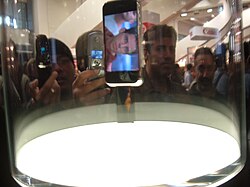
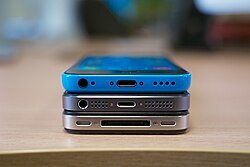
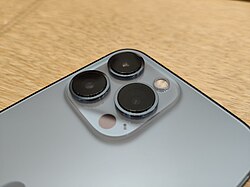
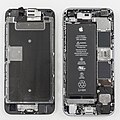


![[icon]](/wiki/File:Wiki_letter_w_cropped.svg)